
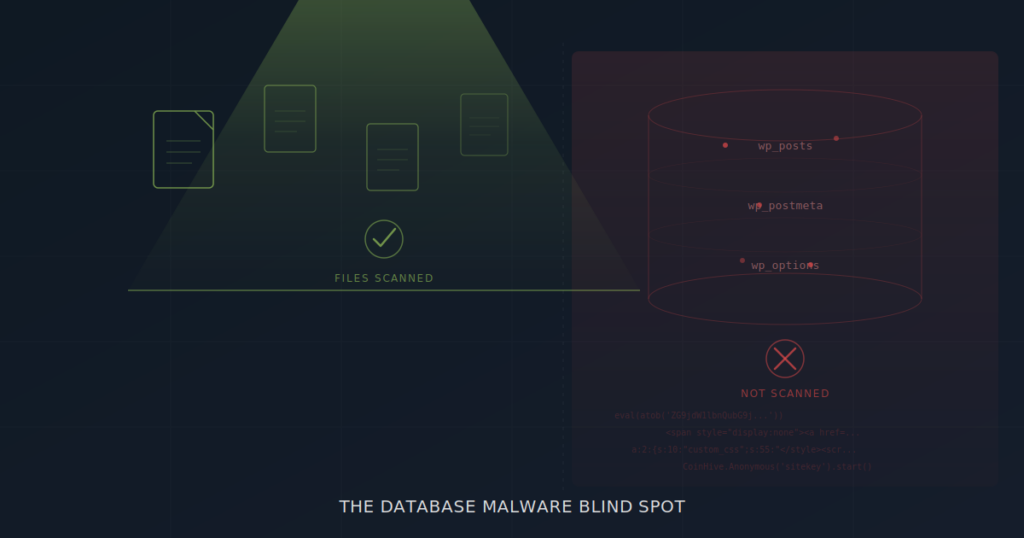
WordPress security has a structural problem, and it isn’t one that better passwords or more frequent updates will solve.
The problem is architectural. The most widely deployed WordPress security tools — Wordfence, Sucuri, MalCare, iThemes Security — are built around file-based scanning. They compare your PHP files against known checksums. They look for malware signatures in theme and plugin directories. They monitor file modifications in /wp-content/ and /wp-includes/. This is important work, and you should absolutely be running one of these tools.
But here’s the gap: database malware doesn’t live in files. It lives in your WordPress content tables — wp_posts, wp_postmeta, wp_options — where no file-based scanner is designed to look. And attackers know this.
This article explains where the blind spot comes from, what database malware actually looks like, and how to close the gap in your WordPress security stack.
How File-Based Scanners Work (And What They’re Designed For)
To understand the blind spot, it helps to understand what file-based scanners are actually doing under the hood. It’s not that they’re doing their job badly — it’s that their job has a defined scope, and database content falls outside it.
A typical file-based security scanner performs three core operations. First, core integrity checking: it downloads the official WordPress core file checksums from api.wordpress.org and compares them against the files on your server. Any file that doesn’t match — modified, added, or missing — gets flagged. Second, signature matching: it scans PHP files, JavaScript files, and occasionally configuration files for patterns that match known malware signatures. These signatures are maintained in regularly updated databases. Third, heuristic analysis: it looks for suspicious patterns even without an exact signature match — things like eval(base64_decode( chains, obfuscated variable names, or suspicious file-system operations.
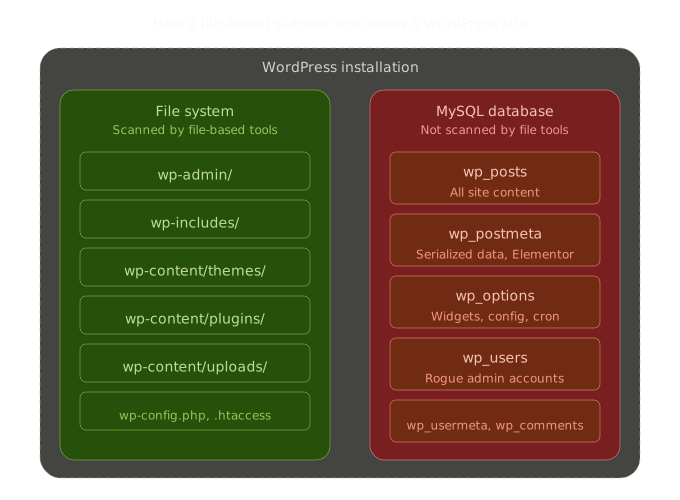
All three operations work on the file system. They traverse directories, read file contents, and compare bytes. What they do not do — by design — is connect to the MySQL database, query table contents, and analyze the data stored in WordPress content fields.
This isn’t negligence. File-based scanners were built for a specific threat model that dominated WordPress security for years: backdoors dropped into theme files, web shells hidden in upload directories, and core file modifications. Against those threats, they remain extremely effective.
The problem is that attackers have moved. The threat model has expanded. And database malware now represents a significant portion of real-world WordPress compromises.
What Lives in the WordPress Database (And Why Attackers Target It)
If you’re not a WordPress developer, you might think of the database as the place that “stores settings.” It stores far more than that. The WordPress database is where your actual content lives — every word your visitors read, every block the editor renders, every widget in your sidebar.
The wp_posts table holds the HTML content of every post, page, and custom post type on your site. This includes the full markup — links, scripts, iframes, and all. The wp_postmeta table holds metadata associated with those posts: custom fields, page builder layout data (Elementor stores its entire page configuration here as serialized JSON), SEO plugin settings, and more. The wp_options table holds site-wide configuration including widget content, theme settings, active plugin lists, and cron schedules.
From an attacker’s perspective, these tables are extraordinarily attractive targets. Injecting malicious content into wp_posts means the payload gets served to every visitor who loads that page — through WordPress’s own rendering engine, with no file modification required. Injecting into wp_options widget fields means the payload renders on every page of the site. Injecting into wp_postmeta means the payload can hide inside serialized data structures that are nearly impossible to read manually.
And because file-based scanners never query these tables, the attacker enjoys a significant advantage: their payload survives any file-level cleanup. You can reinstall WordPress core, delete and reinstall every theme and plugin, and the database malware will still be there, serving spam or redirects to your visitors the moment the site comes back online.
6 Types of Database Malware File-Based Scanners Miss
Database malware isn’t a single technique. It’s a category of threats, each exploiting different aspects of how WordPress stores and renders content. Here are the six most common types we encounter in real-world site cleanups.
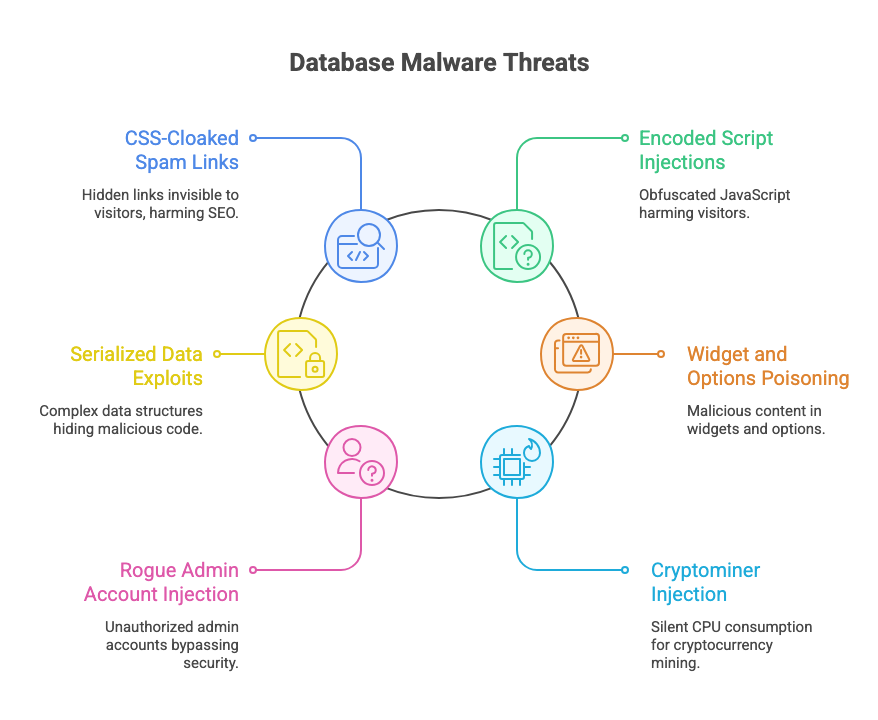
1. CSS-Cloaked Spam Link Injections
This is the most common form of database malware and the engine behind the notorious “Japanese keyword hack,” pharma hack, and casino spam injections. The attacker injects hundreds of hidden links into existing posts and pages using CSS to make them invisible to human visitors:
<div style="position:absolute;left:-9999px;top:-9999px;font-size:0">
  <a href="https://pharma-spam.example">buy cheap viagra</a>
  <a href="https://casino-spam.example">best online casino bonus</a>
  <a href="https://essay-spam.example">cheap essay writing service</a>
</div>
The CSS hiding techniques go beyond simple display:none. Attackers use negative positioning (left:-9999px), zero font size (font-size:0), zero opacity (opacity:0), clipping (clip:rect(0,0,0,0)), zero max-height with hidden overflow, and extremely negative text indentation. Each technique achieves the same goal: invisible to visitors, fully crawlable by search engines.
Google sees these hidden links, attributes them to your domain, and penalizes your site for link spam. Meanwhile, your file scanner reports all clear because no PHP file has changed.
2. Encoded Script Injections
Where spam link injections damage your SEO, encoded script injections actively harm your visitors. Attackers embed obfuscated JavaScript directly into post content, using encoding to evade simple pattern matching:
<script>eval(atob('ZG9jdW1lbnQubG9jYXRpb24uaHJlZj0naHR0cHM6Ly9tYWx3YXJlLmV4YW1wbGUnOw=='))</script>That Base64 string decodes to a redirect. More sophisticated payloads chain multiple encoding layers — Base64 inside URL encoding inside HTML entity encoding — creating multi-layer obfuscation that requires recursive decoding to detect. A three-layer encoded payload looks like random noise to the human eye and passes right through any scanner that isn’t built to decode iteratively.
Some payloads use String.fromCharCode() to construct malicious URLs character by character, or document.write() to inject entire DOM structures after page load. Others use inline event handlers — onerror, onload, onmouseover — attached to seemingly innocent HTML elements like images or divs.
3. Serialized Data Exploits
This is the most technically sophisticated category of database malware, and the one most likely to survive even a manual database inspection. WordPress stores much of its metadata as PHP serialized arrays — a compact data format that looks like this:
a:2:{s:10:"custom_css";s:55:"</style><script>eval(atob('...'))</script>";s:8:"settings";s:5:"basic";}That serialized string contains a CSS breakout attack: the custom_css value closes the style context with </style> and opens a script context to execute arbitrary JavaScript. Because the payload is buried inside a serialized array inside a wp_postmeta row, it’s nearly invisible to manual inspection.
Page builders make this worse. Elementor stores its entire layout configuration as nested JSON inside serialized arrays in _elementor_data meta fields. An attacker who injects malicious content into a deeply nested widget setting — a raw_html widget, a callback function, a custom_attributes field — creates a payload that’s three data structures deep: JSON inside serialized PHP inside a database column.
Detecting this requires a scanner that can safely unserialize PHP data, recursively traverse nested arrays, decode embedded JSON, and run detection patterns against every string value found at every nesting level. File-based scanners don’t attempt any of this.
4. Widget and Options Poisoning
The wp_options table is a high-value target because certain option keys control content that renders on every page of a site. The most commonly targeted are widget_text, widget_custom_html, and widget_block — the options that store sidebar and footer widget content.
An attacker who injects a malicious iframe into a text widget effectively turns every page on the site into a malware delivery mechanism. The iframe might load a drive-by download, a credential phishing page, or a cryptominer. Because widgets render globally — in sidebars, footers, and header areas — the reach is immediate and complete.
Less obvious but equally dangerous: attackers can modify wp_options values that control site behavior. The siteurl and home options control your site’s URL. The cron option controls scheduled tasks. Theme-specific options control which scripts and stylesheets load. Any of these, if modified, can redirect traffic, load external malicious resources, or establish persistence mechanisms — all without changing a single file.
5. Rogue Admin Account Injection
This one is deceptively simple but devastatingly effective. Attackers create new administrator accounts directly in the database by inserting rows into wp_users and wp_usermeta. The rogue accounts typically use generic-sounding usernames that blend in with legitimate accounts.
Because the accounts are created via database injection rather than through WordPress’s user registration system, they don’t trigger any of the usual notifications or logging. The site owner doesn’t receive an email about a new user. The activity log (if one exists) shows nothing. And file-based scanners don’t query the users table, so the rogue account persists until someone manually audits the user list.
Once the attacker has admin access, they can install additional backdoors, modify content, change settings, and establish persistence — all through WordPress’s own admin interface, generating legitimate-looking database writes that blend in with normal operations.
6. Cryptominer Injection
Cryptominers embedded in database content are a particularly insidious form of database malware because they don’t damage your SEO or redirect your visitors. They silently consume your visitors’ CPU resources to mine cryptocurrency for the attacker.
The injection typically takes the form of a JavaScript snippet referencing an external mining library — historically Coinhive (now defunct), CryptoLoot, or JSEcoin, but new variants continue to appear. The script is injected into a post, page, or widget, and runs in the background of every visitor’s browser session. The site owner often doesn’t notice because the site continues to function normally — it just runs slightly slower for visitors.
Why This Blind Spot Persists
Given that database malware is a well-known threat category, you might reasonably ask why the major WordPress security plugins haven’t expanded their scanning to cover it.
There are legitimate technical reasons. Database scanning is fundamentally different from file scanning. File scanning is a read-only operation on the file system — you read files, compare hashes, match patterns, and report. It’s fast, safe, and the worst case is a false positive. Database scanning requires connecting to MySQL, running queries against potentially massive tables (a site with 50,000 posts has 50,000 rows to inspect), parsing structured content (HTML, Gutenberg blocks, serialized data), and doing all of this without impacting site performance or triggering hosting resource limits.
It also requires a fundamentally different pattern library. File-based malware signatures (PHP backdoors, web shells, file-system operations) have minimal overlap with database malware patterns (CSS cloaking, SEO spam lexicons, serialized data traversal, multi-layer encoding). Building and maintaining a database-specific detection engine is essentially building a second product.
And then there’s the false positive problem. A post legitimately using display:none for an accessible screen-reader span should not be flagged as malware. A widget containing a YouTube iframe is not a threat. A Gutenberg block with an embedded Google Maps script is normal. Database scanning requires accessibility-aware rules, domain allowlists, and contextual analysis that goes well beyond simple pattern matching.
These are hard problems. They’re solvable — but they require a purpose-built tool, not a bolt-on feature added to an existing file scanner.
Bridging the Gap: What Database-First Scanning Looks Like
This is why we built Content Guard Pro. Not as a replacement for file-based scanners, but as the database-specific layer they were never designed to include.
Content Guard Pro connects to your WordPress database and scans the tables where database malware actually lives. Here’s what that means in practice.
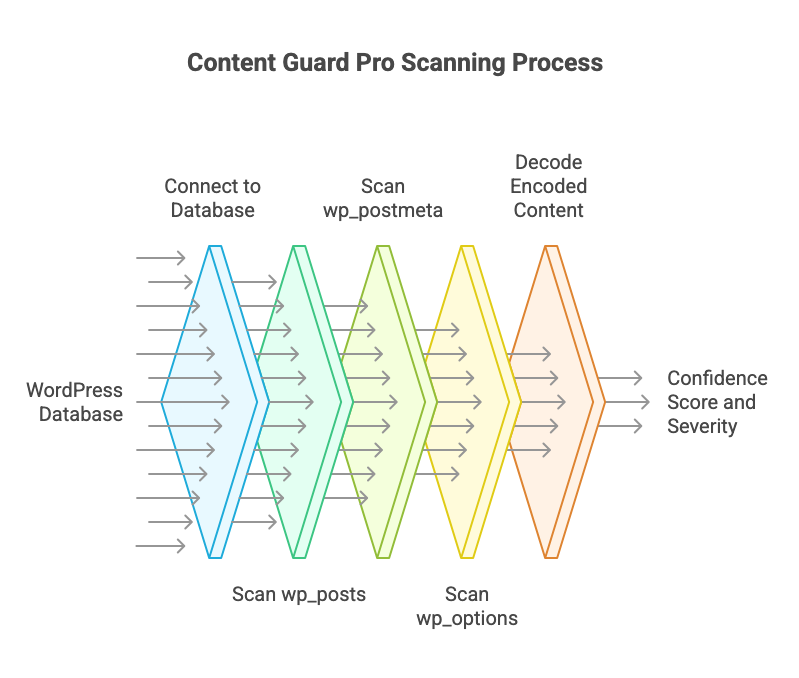
For wp_posts, the scanner inspects post_title, post_excerpt, and post_content across all post types and statuses. For posts using the block editor, it calls WordPress’s native parse_blocks() function to recursively parse Gutenberg blocks and scan each block’s content individually — catching threats hidden inside nested block structures that would be invisible in a flat text scan.
For wp_postmeta, the scanner safely unserializes PHP serialized arrays and recursively traverses nested data structures up to 10 levels deep. It decodes embedded JSON (critical for Elementor data), runs full detection patterns against every string value found at every nesting level, and boosts confidence scores for content found in high-risk keys like custom_css, callback, raw_html, and custom_attributes.
For wp_options, the scanner targets an allowlist of high-risk option keys — the widget content fields and block content arrays where database malware most commonly hides — rather than scanning the entire options table indiscriminately.
The multi-layer decoder handles up to three levels of chained encoding — Base64, URL encoding, HTML entities, ROT13, hex, and octal — with entropy validation and size limits to prevent resource exhaustion. Content that requires multiple decoding layers to reveal its true nature receives an automatic confidence boost of +20, because legitimate content is almost never multi-layer encoded.
Every finding comes with a confidence score (0–100), a severity classification (Critical, Suspicious, or Review), and a transparent breakdown of which signals contributed to the score. Accessibility-aware rules recognize legitimate .sr-only and .visually-hidden patterns and reduce their weight unless combined with external links or scripts. Domain allowlists prevent false positives on trusted embedded content from YouTube, Google Maps, Vimeo, and other common sources.
The free version on WordPress.org covers Quick Scan (all wp_posts content) plus on-save scanning in both editors. The premium version adds Standard Scan (postmeta and options), scheduled daily scans, non-destructive quarantine, email alerts, and reputation checking via Google Safe Browsing and PhishTank.
If you’re already running Wordfence or Sucuri — good, keep running them. They cover the file layer. Content Guard Pro covers the database layer. Together, you have actual complete coverage.
How to Audit Your WordPress Database Right Now
You don’t need to install anything to do an initial check. Here are four SQL queries you can run in phpMyAdmin, Adminer, or via WP-CLI to see if your database shows signs of infection.
Check wp_posts for suspicious content
SELECT ID, post_title, post_type, post_status
FROM wp_posts
WHERE post_content LIKE '%eval(%'
   OR post_content LIKE '%base64_decode%'
   OR post_content LIKE '%display:none%'
   OR post_content LIKE '%position:absolute%left:-9999%'
   OR post_content LIKE '%fromCharCode%'
   OR post_content LIKE '%document.write%'
LIMIT 50;
Check widgets for injected scripts
SELECT option_name, LEFT(option_value, 500) AS preview
FROM wp_options
WHERE option_name IN ('widget_text', 'widget_custom_html', 'widget_block')
  AND (option_value LIKE '%<script%'
    OR option_value LIKE '%<iframe%'
    OR option_value LIKE '%eval(%');
Check for rogue admin accounts
SELECT u.ID, u.user_login, u.user_email, u.user_registered
FROM wp_users u
INNER JOIN wp_usermeta m ON u.ID = m.user_id
WHERE m.meta_key = 'wp_capabilities'
  AND m.meta_value LIKE '%administrator%'
ORDER BY u.user_registered DESC;
Check for suspicious cron entries
SELECT option_value FROM wp_options WHERE option_name = 'cron';If any of those queries return results you don’t recognize, you’re looking at potential database malware. The manual queries above catch the obvious cases — but they won’t detect multi-layer encoded payloads, serialized data exploits, or threats hiding inside Gutenberg block structures. For comprehensive coverage, you need a purpose-built database malware scanner.
Install Content Guard Pro from WordPress.org, run a Quick Scan, and see what your file scanner has been missing. It takes under a minute, and it might change how you think about WordPress security.