

SQL injection in 2026: a solved problem?
Injection held the #1 spot on the OWASP Top 10 for several editions, from 2010 through 2017. That’s seven years as the single most critical risk to web applications. Then in 2021 it dropped to #3, behind broken access control and cryptographic failures. In 2025 it landed #5, so slightly declining but still it is something we face. The reasons are real: prepared statements became the default in every major framework, ORMs abstracted away raw SQL for most developers, and static analysis tools got genuinely good at flagging concatenated queries before they ship. Credit where it’s due for WordPress SQL injection prevention.
The numbers back this up. Patchstack’s vulnerability data for 2025 puts SQL injection at roughly 7% of all disclosed WordPress vulnerabilities. XSS dominates at over 35%, with CSRF and broken access control each claiming double-digit shares. If you’re reading those percentages and thinking SQLi is a rounding error, you’re looking at the wrong column.

Percentage of total disclosures isn’t the same as percentage of actual risk.
SQL injection vulnerabilities in WordPress plugins are disproportionately severe. They tend to be unauthenticated (no login required to exploit), and they tend to land critical CVSS scores. Patchstack’s H1 2025 data found that 57% of all WordPress vulnerabilities required no authentication whatsoever. That stat covers every vulnerability type, but SQLi punches above its weight here: an unauthenticated injection gives an attacker direct read/write access to your database. No privilege escalation needed. No social engineering. Just a crafted request to a vulnerable endpoint.
Look at real examples from 2025 alone. The Depicter Slider plugin (CVE-2025-2011) had an unauthenticated SQL injection through its search parameter, letting anyone run arbitrary queries against the site’s database. That’s a plugin installed on production sites, with a vulnerability that required zero credentials to exploit. These aren’t theoretical risks in a CTF challenge.
So what actually changed? WordPress core is well-hardened. $wpdb->prepare() has been available since WordPress 2.3 (2007), and core itself uses it consistently. The attack surface shifted to the plugin and theme ecosystem, where 96% of all WordPress vulnerabilities live. Independent developers building on top of WordPress don’t always follow the same code review standards that core contributors do. Some use $wpdb->query() with string concatenation. Some trust $_GET parameters after a casual sanitize_text_field() that does nothing to prevent injection. Some build custom table queries that bypass $wpdb entirely.
The other shift is what happens after a successful injection. File-based scanners will catch a PHP backdoor dropped into /wp-content/uploads/. They won’t catch a pharma spam payload written directly into wp_posts, or a redirect script injected into serialized Elementor data in wp_postmeta, or a malicious JavaScript snippet tucked inside a widget_block option value. The injection itself may be patched within days. The data it left behind in your database can persist for months, quietly damaging your SEO and serving malicious content to visitors, while your file integrity scanner reports all clear.
SQL injection didn’t get solved. It got reclassified as somebody else’s problem. WordPress core handled its part. The plugin ecosystem still has gaps. And the post-exploitation damage hides in the one place most security tools aren’t scanning. That’s why database security is important.
Why WordPress core is secure (but your plugins might not be)
WordPress gets a bad reputation for security. Most of it is undeserved, at least when it comes to core. The WordPress team has spent nearly two decades hardening the database layer, and the result is a prepared statement system that works well if you actually use it.
How $wpdb->prepare() actually works
The $wpdb class provides three placeholder types. %s for strings, %d for integers, and %i for identifiers like table and field names (added in WordPress 6.2). When you write a query like this:
$wpdb->get_results( $wpdb->prepare( "SELECT post_title FROM %i WHERE post_status = %s AND post_author = %d", $wpdb->posts, $status, $author_id ) );prepare() does two things. It enforces type constraints (an integer placeholder will cast the value to int, rejecting string payloads entirely), and it escapes string values through mysqli_real_escape_string() before wrapping them in quotes. The %i identifier placeholder backtick-wraps table and column names, preventing an attacker from breaking out of an identifier context. Together, these make parameterized injection through prepare() effectively impossible when used correctly.
There’s a subtlety worth knowing. Before WordPress 6.2, developers who needed dynamic table names had no identifier placeholder. They’d interpolate the variable directly into the query string or use sprintf(). That old pattern still appears in thousands of plugins, and it’s technically safe only when the variable comes from a trusted source like $wpdb->posts. When it comes from user input, it’s a vulnerability.
WordPress’s own developer documentation states the principle plainly: untrusted data comes from many sources, including “your own database,” and all of it needs to be checked before it’s used. That’s a remarkably honest position for a platform to take about its own data layer. They’re telling you that even data you previously saved might have been tampered with, and that output escaping matters as much as input sanitization.
Where the protection ends
WordPress core uses prepare() consistently. Seven vulnerabilities in core during all of 2024, none of them critical. That’s strong security engineering.
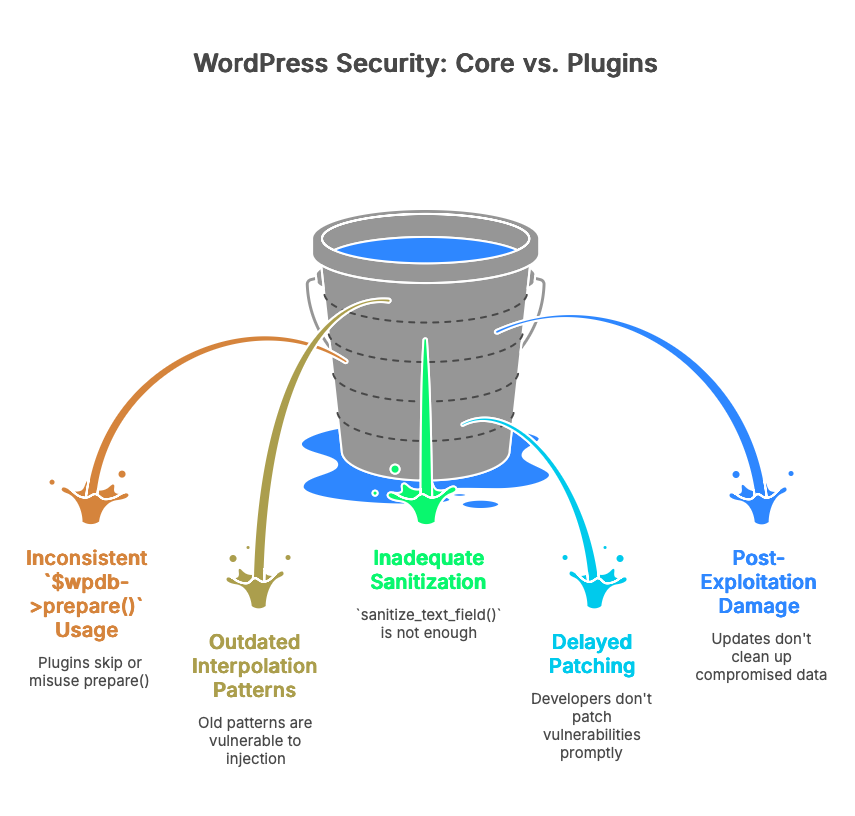
The 60,000+ plugins in the WordPress.org directory are a different story. Each one is built by an independent developer or team, with their own coding standards, their own testing practices, and their own relationship with $wpdb->prepare(). Some skip it entirely. Some use it for one query and forget it for the next. Some call sanitize_text_field() on user input and assume that’s enough to prevent injection (it isn’t, sanitize_text_field() strips tags and extra whitespace but does nothing to neutralize SQL metacharacters).
WordPress.org does review plugins before they’re listed. Since late 2024, every plugin submission gets an automated scan through the Plugin Check tool, followed by a human review. In 2025, the Plugins Team reviewed over 12,700 submissions, identified 59,000+ issues, and expanded automated scanning to cover plugin updates as well as initial submissions. That’s genuine progress. But review happens at submission time. A plugin that passes review in version 1.0 can introduce a SQL injection vulnerability in version 1.4 through a new custom query, and that update won’t necessarily get the same level of scrutiny.
Patchstack’s 2024 data puts a number on this gap: more than half of plugin developers who received a vulnerability report from Patchstack didn’t patch the issue before public disclosure. That means the vulnerability was known, documented, and published with a CVE, and the plugin’s users were still running vulnerable code because the developer hadn’t shipped a fix.
This is the prevention paradox for site owners. You can write perfect code in your own custom theme. You can follow every recommendation in the WordPress security handbook. And you can still end up with a SQL injection vulnerability on your site because a form plugin, a slider, or a statistics widget used $wpdb->query() with concatenated user input instead of $wpdb->prepare(). You didn’t write the vulnerable code. You probably never saw it. But you installed it in good faith, and now it’s your problem.
The fix for the vulnerability itself is straightforward: update the plugin, or remove it. The harder question is what happened between the time the vulnerability existed and the time you patched it. If an attacker exploited that window, they may have written data directly into your wp_posts or wp_postmeta tables. The plugin update closes the door. It doesn’t clean up what walked through it.
The coding mistakes that let attackers in
SQL injection in WordPress plugins isn’t usually caused by developers ignoring security entirely. It’s caused by developers reaching for the wrong tool, or using the right tool incorrectly. The same four or five anti-patterns appear in CVE after CVE, year after year. Understanding them is the fastest way to audit your own code and evaluate the plugins you depend on.
esc_sql() without quoting the value
This is the single most common WordPress SQLi pattern, and it catches experienced developers. esc_sql() escapes characters that would break out of a quoted string context: single quotes, double quotes, backslashes. If you use it correctly, wrapping the escaped value in quotes in your SQL, it works fine.
The problem is when you don’t quote it.
// Vulnerable: escaped but not quoted $id = esc_sql( $_POST['multiformid'] ); $wpdb->query( "SELECT * FROM {$wpdb->prefix}form_fields WHERE form_id = $id" ); // An attacker sends: 1 UNION SELECT user_pass FROM wp_users-- // esc_sql() does nothing here because the payload contains no quotes // The resulting query: SELECT * FROM wp_form_fields WHERE form_id = 1 UNION SELECT user_pass FROM wp_users--That’s exactly what happened in JS Help Desk (CVE-2026-2511, CVSS 7.5). The storeTickets() function passed the multiformid parameter through esc_sql() but left the result unquoted in the SQL string. Since numeric injection payloads, UNION queries with hex-encoded strings, and conditional blind techniques don’t require quote characters, the escaping was irrelevant. Unauthenticated. No login required.
The fix is either quotes plus escaping, or (better) $wpdb->prepare():
// Fixed: use prepare() with a typed placeholder $id = intval( $_POST['multiformid'] ); $wpdb->get_results( $wpdb->prepare( "SELECT * FROM {$wpdb->prefix}form_fields WHERE form_id = %d", $id ) );sanitize_text_field() on SQL-context input
sanitize_text_field() strips HTML tags, removes line breaks, strips extra whitespace, and removes null bytes. It’s built to make a string safe for display. It does absolutely nothing to neutralize SQL metacharacters like parentheses, commas, or keywords like UNION, SELECT, or SLEEP.
Developers reach for it because the name sounds authoritative. “I sanitized the field.” But sanitizing for display and sanitizing for SQL are completely different operations. Patchstack Academy’s SQLi walkthrough uses this exact mistake as their primary teaching example, showing a cookie value passed through sanitize_text_field() and then concatenated directly into an ORDER BY clause.
The Quiz and Survey Master plugin (CVE-2026-2412) had a variation of this. The merged_question parameter was cleaned with sanitize_text_field(), then concatenated into a SQL IN() clause without $wpdb->prepare() or integer casting. An attacker with Contributor-level access could inject SQL through parentheses and boolean operators that sanitize_text_field() doesn’t touch. Ten million quiz submissions across 40,000+ installs, and the query that powered the merge feature was injectable.
The right tool for ORDER BY clauses is sanitize_sql_orderby(), which validates against a strict pattern of column names and ASC/DESC modifiers. For IN() clauses, cast every value to int or build the placeholder string dynamically with $wpdb->prepare(). There is no shortcut.
Backtick-wrapping that bypasses esc_sql()
esc_sql() escapes quotes and backslashes. It does not escape backticks.
In MySQL, backticks delimit identifiers (table names, column names). If a plugin’s database abstraction layer checks whether user input “looks like a column name” by testing for backtick wrapping, an attacker can force their payload to be treated as an identifier rather than a value. Once the input crosses from value context to identifier context, esc_sql() is no longer relevant.
WP Maps (CVE-2026-3222, CVSS 7.5) had this exact flaw. The plugin’s FlipperCode_Model_Base::is_column() method interpreted any backtick-wrapped input as a column name, bypassing escaping entirely. The location_id parameter was passed directly to a database query through the wpgmp_return_final_capability method. The attack chain had a second problem stacked on top: the wpgmp_ajax_call handler was registered with wp_ajax_nopriv, meaning unauthenticated users could call it, and the handler allowed invoking arbitrary class methods. So an anonymous visitor could trigger the vulnerable method with a crafted location_id containing time-based blind SQL injection payloads.
Two mistakes in sequence (backtick bypass plus overly permissive AJAX routing) turned a nuanced escaping gap into a straightforward unauthenticated data exfiltration path.
stripslashes() after $wpdb->prepare()
This one is painful because the developer did the right thing first. They used $wpdb->prepare(). The query was parameterized. The escaping was applied correctly. And then they undid it.
// The developer wrote this: $query = $wpdb->prepare( "SELECT * FROM {$wpdb->prefix}custom_questions WHERE question_id IN (%1s)", $question_sql ); $questions = $wpdb->get_results( stripslashes( $query ) );That stripslashes() call on the prepared query removes the backslashes that prepare() added for escaping. The query goes to MySQL with its protective escaping stripped away.
Why do developers do this? WordPress adds “magic quotes” to all superglobal input ($_GET, $_POST, $_COOKIE, $_SERVER) through its internal wp_magic_quotes() function. This means input arrives pre-slashed. When that pre-slashed input goes through prepare(), the escaping adds a second layer of slashes. The developer sees doubled backslashes in their debug output, assumes something went wrong, and adds stripslashes() to “fix” it. They’re fixing the cosmetics while breaking the security. Patchstack Academy highlights this pattern specifically because it shows up repeatedly in reviewed code.
The correct approach: use wp_unslash() on the raw input before passing it to prepare(), never after.
These aren’t small plugins
If you’re reading these examples and thinking “sure, but I only install popular, well-maintained plugins,” consider Ally. Formerly known as One Click Accessibility, it’s an Elementor plugin with over 400,000 active installations. CVE-2026-2413 was an unauthenticated SQL injection through the URL path. The get_global_remediations() method concatenated a user-supplied URL directly into a SQL JOIN clause. The developer applied esc_url_raw() for URL validation, but that function ensures a string is a valid URL. It doesn’t strip SQL metacharacters like single quotes and parentheses. Wrong sanitization function, same result.
Drew Webber at Acquia found it in February 2026. Elementor patched it within ten days of notification. But for every site that updated promptly, there were sites that didn’t. A month after the patch, reports suggested over 250,000 installations were still running the vulnerable version.
Active installs and developer reputation don’t make a plugin immune to these mistakes. The four patterns above repeat because they look like the developer tried to do security right. They reached for an escaping function. They used prepare(). They sanitized the input. But each time, a gap between what the function actually does and what the developer assumed it does created an opening. That gap is where the injection lives.
What happens after a successful injection
Most SQL injection articles end at prevention. Patch the plugin, use prepared statements, move on. But prevention has a time gap. Between the moment a vulnerability exists and the moment you patch it, an attacker may have already written data into your database. That data stays behind after the update.
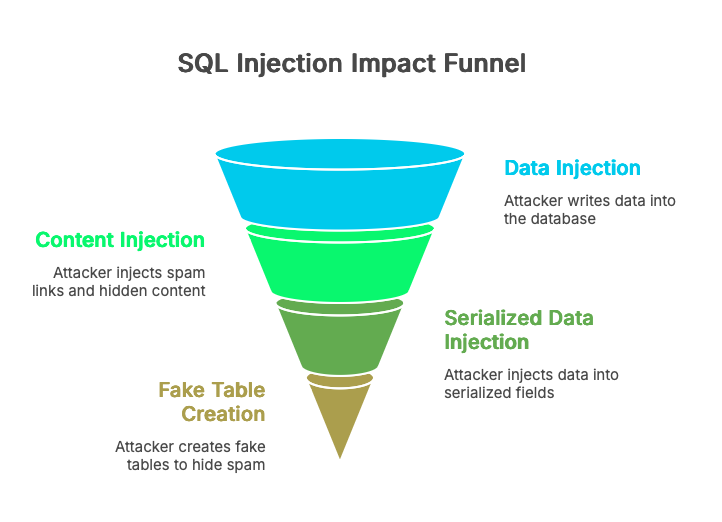
Content injection: the quiet takeover
Once an attacker has write access to your database, they don’t need to upload a shell or modify a PHP file. They modify wp_posts.post_content directly, injecting spam links (pharma, casino, crypto lending), hidden iframes, or conditional redirect scripts. The injected content is typically wrapped in CSS that hides it from human visitors: display:none, position:absolute; left:-9999px, or font-size:0. Invisible on the front end. Perfectly visible to Googlebot.
The Japanese keyword hack is the textbook example. Hundreds of posts get modified with Japanese-language spam content, and the site owner doesn’t notice because the content is cloaked. They find out when Google Search Console shows thousands of indexed pages in a language they don’t speak, or when their organic traffic drops because Google flagged the site.
Serialized data: the deeper hiding spots
Modifying post_content is obvious if anyone bothers to look. Serialized fields are harder to inspect. Attackers inject payloads into wp_postmeta (Elementor’s _elementor_data, widget configurations, custom field values) and wp_options (widget areas, theme mod settings). The data is stored as serialized PHP arrays or nested JSON, so it doesn’t show up cleanly in phpMyAdmin or a casual SELECT query.
Gutenberg blocks add another layer. A malicious script wrapped in valid block comment markup (<!-- wp:html -->) looks perfectly normal in the block editor’s visual mode. You’d have to switch to the code editor and scroll through the raw HTML to spot it.
Sucuri documented a particularly creative variant: attackers creating entirely fake database tables with a backupdb_ prefix to store and rotate spam posts. The malware hijacked WordPress’s own database connection, swapped to the fake tables during page rendering, injected spam links into the response, then switched back to the real tables before WordPress finished processing. The site’s admin dashboard showed nothing unusual. The spam only existed in the rendered output that search engines crawled.
The site looks fine. Your file scanner agrees
Here’s the part that frustrates people. The attacker touched zero files. WordPress core integrity check passes. .htaccess is untouched. wp-content is clean. Wordfence’s file scan, Sucuri SiteCheck, MalCare’s file scanner: they all report exactly what they should, because there’s nothing wrong with the filesystem. These tools are doing their job well. The gap isn’t a failure of file-based scanners. It’s an architectural boundary. They scan files. The injected content is in database rows.
We’ve seen this firsthand. A site running both Wordfence and Sucuri, both reporting clean, while the database held over 200 modified posts containing hidden affiliate links wrapped in display:none spans. The site owner’s first clue wasn’t a security alert. It was a Google Search Console notification about “spammy content detected.” The files were clean. The database wasn’t. That gap between file-level security and database-level visibility is where Content Guard Pro operates: scanning wp_posts, wp_postmeta, and wp_options for the patterns file scanners can’t reach, while complementing the file-level protection those tools already provide.
Check your database now
You don’t need a plugin to start looking. Open phpMyAdmin, Adminer, or a MySQL CLI session and run these queries against your WordPress database. Replace wp_ with your actual table prefix.
Query 1: external scripts in post content
SELECT ID, post_title, post_status, post_date FROM wp_posts WHERE post_content LIKE '%<script%src=%' AND post_status IN ('publish', 'draft', 'private') ORDER BY post_date DESC;Some results will be legitimate. Embedded third-party widgets, analytics snippets you added intentionally, or code examples in a technical blog post. What you’re looking for are script sources you don’t recognize, domains you’ve never heard of, or scripts appearing in posts you didn’t edit recently. A crypto miner loading from a random CDN subdomain, a redirect script from a freshly registered domain, an iframe loader you can’t explain. If you see one suspicious result, check the others carefully.
Query 2: hidden content patterns in postmeta
SELECT post_id, meta_key, LEFT(meta_value, 200) AS snippet FROM wp_postmeta WHERE ( meta_value LIKE '%display:none%' OR meta_value LIKE '%visibility:hidden%' OR (meta_value LIKE '%position:absolute%' AND meta_value LIKE '%left:-9999%') ) AND meta_key NOT IN ('_wp_page_template', '_edit_lock') LIMIT 50;This will produce false positives. Mobile menu toggles, screen-reader-only text, and accordion widgets all use these CSS patterns for legitimate reasons. You’re evaluating context: hidden content in an Elementor widget that contains pharma keywords or outbound links to domains you don’t control is not a menu toggle. Skim the snippet column. If you see anchor tags with unfamiliar hrefs buried in otherwise normal-looking widget data, investigate that post.
Query 3: unexpected database tables
SELECT TABLE_NAME FROM information_schema.TABLES WHERE TABLE_SCHEMA = DATABASE() AND TABLE_NAME NOT LIKE 'wp\_%' ORDER BY TABLE_NAME;Adjust the prefix pattern to match yours. Every table returned by this query exists outside your WordPress installation’s expected schema. Some will belong to plugins that use their own prefix conventions. Others might be the backupdb_-style staging tables that attackers use to store and rotate SEO spam content without touching your real posts. If you see tables you can’t trace to an installed plugin, look at what’s in them.
These three queries are simplified versions of what a database-level scanner automates across dozens of detection patterns. We built Content Guard Pro because running checks like these manually against 15 client sites every week isn’t sustainable. But right now, on your own site, they’ll tell you whether you have a problem that your file scanner hasn’t mentioned.
A practical WordPress SQL injection prevention checklist
Everything above distills into three layers. Prevention stops the injection. Detection catches what prevention missed. Response limits the damage.
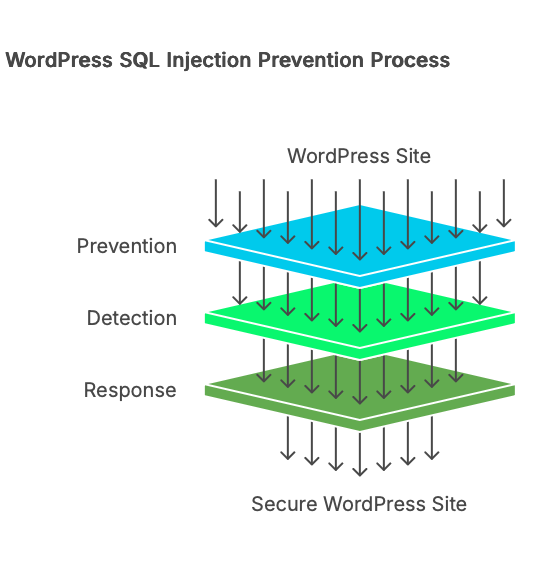
Prevention layer
Update plugins the day patches ship, not the day you get around to it. Most WordPress SQLi vulnerabilities are patched within days of disclosure. The window between public CVE and applied update is when automated exploitation happens. Turn on auto-updates for security releases if you can tolerate the risk, or build a workflow that gets patches applied within 48 hours.
Remove plugins and themes you aren’t using. Deactivating a plugin doesn’t remove its code from disk. If a deactivated plugin registers an AJAX handler with wp_ajax_nopriv (like the WP Maps example mentioned earlier), that endpoint may still be reachable. Delete what you don’t need.
Put a WAF in front of your site. Cloudflare’s managed ruleset, Patchstack’s virtual patching, or Wordfence’s firewall module can all block known SQLi patterns at the request level before they reach your PHP code. No WAF catches everything, but they stop the commodity scanners that probe every WordPress site on the internet.
Restrict your WordPress database user’s privileges. WordPress needs SELECT, INSERT, UPDATE, DELETE, CREATE, ALTER, INDEX, and DROP. It does not need FILE, PROCESS, SUPER, or GRANT. Removing those limits what an attacker can do even if an injection succeeds.
If you write custom code: use $wpdb->prepare() for every query that includes external input. Never use esc_sql() without quoting the escaped value. Cast ORDER BY and LIMIT values to integers or validate them against an allowlist. Use sanitize_sql_orderby() for sort parameters. Treat these as non-negotiable habits.
Detection layer
Subscribe to vulnerability disclosure feeds for your plugin stack. Patchstack’s database and Wordfence’s threat intel both publish advisories with affected versions and patch status. Knowing your exposure before an exploit circulates is worth more than any reactive scan.
Run the database queries from the previous section on a regular schedule, or use a scanner that does it for you. File-based scanning covers one half of your attack surface. The database is the other half. Content Guard Pro automates this database-layer scanning, checking wp_posts, wp_postmeta, and Gutenberg blocks for the patterns described in this article, complementing your existing file-based scanner.
Response layer
If you find injected content in your database, don’t delete it immediately. Document the affected rows: post IDs, injection content, timestamps. Check your plugin update history to identify which vulnerability was the likely entry point. Trace whether the attacker created any admin accounts or modified wp_options values like siteurl or users_can_register.
Clean the database content once you’ve documented the scope. Update or remove the vulnerable plugin. Reset passwords for any admin accounts. If the injection was unauthenticated, assume the attacker could read your entire database, including password hashes and email addresses stored in wp_users.
For step-by-step database cleanup procedures, see our guide: Hidden spam links in your WordPress database: how to find and remove them.