
The blind spot: why your file scanner came back clean
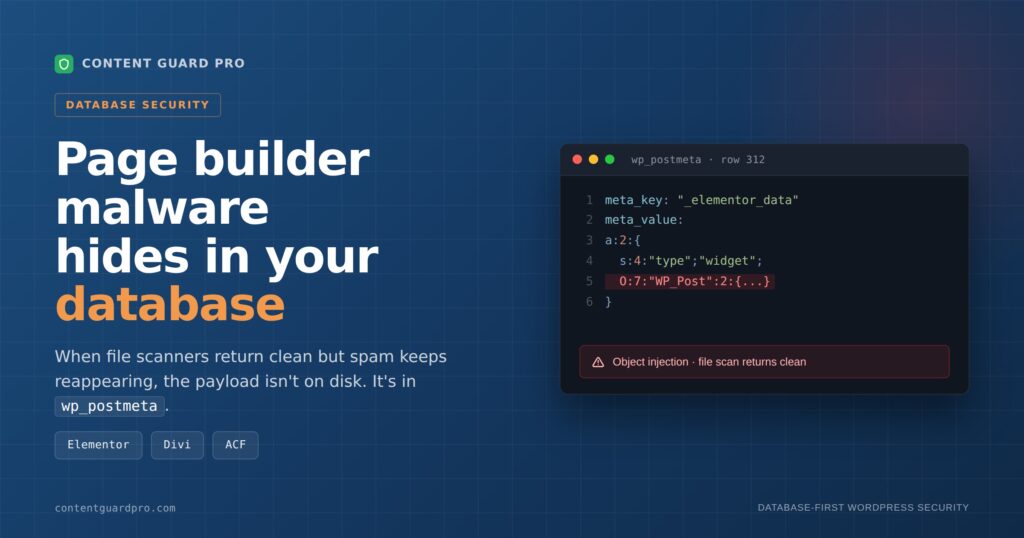
When Wordfence and Sucuri both return clean but your site is still ranking for pharma keywords and reinstalling Elementor changes nothing, the problem isn’t that your scanner missed something in the files — it’s that the payload isn’t in the files at all. Elementor stores its entire page layout as serialized PHP data in a single wp_postmeta row under the key _elementor_data. Divi spreads its builder state across _et_pb_use_builder, _et_builder_version, and _et_pb_post_content. ACF attaches a separate wp_postmeta row to every custom field your site uses. A poisoned row in any of these survives plugin reinstallation, theme swaps, and file-layer malware scans because it is in WordPress page builder malware database, not on disk — and this article shows you exactly which meta_key values to query, what a weaponized serialized payload looks like when you find it, and two SQL queries you can run in phpMyAdmin right now to audit your database before or without purchasing any tool.
What the standard Wordfence plugin actually scans
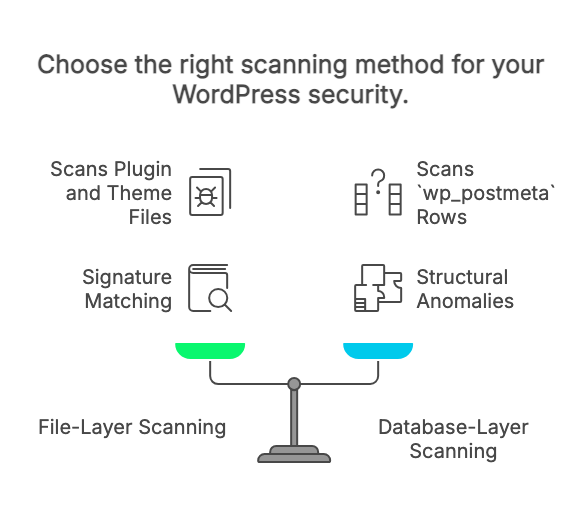
Wordfence’s documented scan options confirm that its malware scan targets files — plugin files, theme files, WordPress core files — along with selected signature matching against wp_options. A Wordfence support response on the official forums put it plainly: “The infection may be in a database table that our plugin doesn’t scan.” That’s not a criticism of Wordfence; it’s an accurate description of architectural scope. File-layer scanning and postmeta scanning are different problems, and Wordfence solves the file-layer problem well.
Wordfence CLI 5.0.1, released in November 2024, added a db-scan feature that extends detection to WordPress databases. That’s a meaningful development, but it’s a server-level command-line tool that requires SSH access and manual execution — not the plugin running scheduled scans through your WordPress dashboard. If you’re managing client sites through a hosting panel and don’t have SSH, the CLI tool isn’t yet part of your workflow. If you do have SSH, it’s worth adding — but it doesn’t change what the plugin itself covers right now.
When Wordfence, Sucuri, MalCare, or Patchstack returns clean and the infection persists, that result isn’t wrong — it’s telling you the payload isn’t in the files. A wp_postmeta row has no known-good file to compare against, no checksum to validate, and no place in the filesystem for a file scanner to examine. Your next diagnostic step isn’t to re-run the file scan with different settings. It’s to open phpMyAdmin or a WP-CLI session and query wp_postmeta directly — filtering by the specific meta_key values your builders use and looking for structural anomalies in meta_value. WordPress page builder malware database is place to check.
How a serialized payload becomes executable
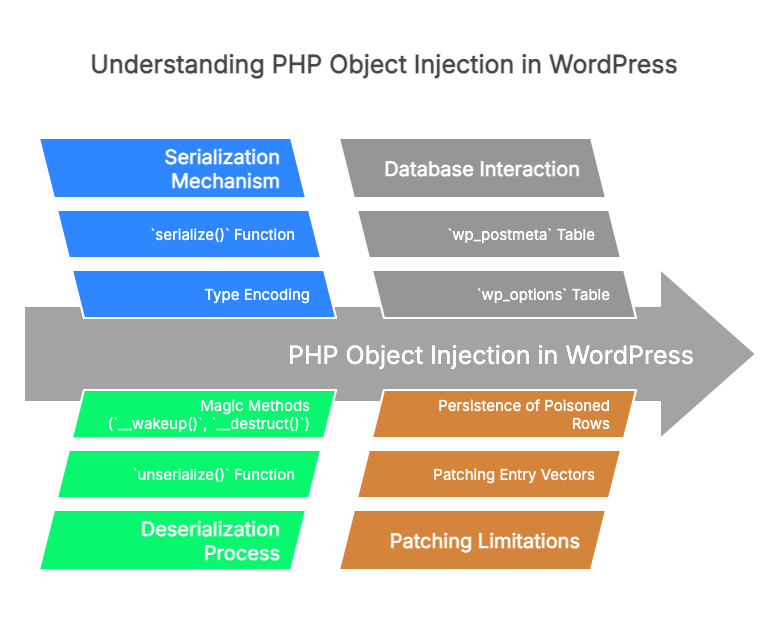
PHP’s serialize() function converts any PHP value — a string, an array, an integer, a full object — into a compact, reversible string. The format encodes type information as a prefix: s: for string, a: for array, i: for integer, and O: for object. That last one is where the risk concentrates. A value serialized as O:7:"WP_Post":2:{...} isn’t just data being stored and retrieved — it’s an instruction to PHP to reconstruct a live object of a specific named class when unserialize() runs. WordPress calls maybe_unserialize() automatically every time it reads a wp_postmeta row, which means any serialized value you’ve stored there gets deserialized on retrieval, without your code explicitly asking for it.
The attack scenario follows directly from that behavior. If an attacker can write a crafted serialized string into a wp_postmeta row, and that string encodes an object whose class defines a PHP magic method like __wakeup() or __destruct() with exploitable logic, the payload executes the moment WordPress reads the row back out — not when a file is included, not when a function is called, but as a side effect of a normal database read. Secarma’s WooCommerce object injection research captured a real example: a wp_postmeta-sourced string beginning with O:7:"WP_Post" being passed through the deserialization path.
Two CVEs that anchor this to documented reality
CVE-2018-20148 documents that Contributors in WordPress versions before 4.9.9 and 5.x before 5.0.1 could inject PHP objects via crafted serialized metadata delivered through the XMLRPC wp.getMediaItem call, running through wp_postmeta handling in WordPress core, and is corroborated by entries in the WPScan database and Acunetix. The vulnerability was patched, but it established something structural: wp_postmeta is a documented injection surface in WordPress itself, not an edge case of a poorly written plugin.
A more recent precedent is ACF versions up to and including 6.0.7, which had a documented PHP Object Injection vulnerability — confirmed by Wordfence Intelligence, Patchstack, and Acunetix — allowing authenticated Contributor-level users to inject arbitrary PHP objects via custom field values stored directly in wp_postmeta. The practical implication: any site running ACF ≤ 6.0.7 with contributor-level user accounts active had a window during which a poisoned row could have been written. Patching ACF closes the entry vector; it does nothing to a row that was already written before the patch. CVE-2022-21663, analyzed in depth by Sonar and patched in WordPress 5.8.3, shows the same deserialization mechanism operating one table over in wp_options. WordPress page builder malware database can be full of such vulnerabilities.
Why patched CVEs still leave rows behind
The patch closes the door through which the serialized payload entered. It does nothing about a payload written to wp_postmeta before the patch, or one introduced through an unrelated vulnerability on a different plugin. Plugin reinstallation replaces files in wp-content/plugins/ but does not touch database tables. A poisoned row attached to post ID 312 under _elementor_data or an ACF field key is post data — it belongs to the content layer, not the code layer, and no reinstallation process reaches it. Theme swaps operate on the same logic: theme files change, wp_postmeta rows do not.
There’s a sharper version of this persistence problem worth understanding. Sucuri researchers documented malware that modifies Wordfence’s own stored settings in the database to make the dashboard appear to show active scanning while scans are effectively disabled. Once a payload gets into WordPress page builder malware, database is a place to check. Database-resident, it can operate on the configuration of the tools you’re using to find it — which is precisely why auditing the database layer directly, rather than relying on what any dashboard UI reports, is the correct diagnostic posture.
Reading a serialized payload: clean vs. poisoned
The first time you see a raw _elementor_data value in phpMyAdmin, it looks like noise. The second time, you start to see the shape.
Anatomy of a clean Elementor row
Elementor stores its layout as JSON — not PHP-serialized arrays the way ACF and Divi tend to — so a healthy _elementor_data value starts with [ and consists of nested arrays of widget objects. A truncated clean example:
[
  {
    "id": "a1b2c3",           // Elementor-generated widget ID — short hex string
    "elType": "section",      // top-level layout container
    "settings": {             // CSS and layout settings for this container
      "background_color": "#ffffff"
    },
    "elements": [
      {
        "id": "d4e5f6",
        "elType": "widget",
        "widgetType": "text-editor",  // no object notation here; just strings
        "settings": {
          "editor": "<p>Normal paragraph text.</p>"
        },
        "elements": []
      }
    ]
  }
]
Everything in a clean row is arrays, strings, and scalar values. Widget IDs are short alphanumeric tokens. Settings values contain recognizable CSS, markup, or numbers. There are no PHP type prefixes, no O: notation, no <script> tags outside of explicitly script-embedding widgets, and no base64 blobs longer than a small icon. Elementor icons stored as SVG data URIs do appear as base64 strings, but they are short (typically under 200 characters) and decode to recognizable XML.
ACF and Divi rows look different because they rely on PHP serialization rather than JSON. A clean ACF field value stored in wp_postmeta might read a:3:{s:5:"title";s:12:"Product Name";s:5:"price";s:4:"9.99";s:4:"sku";s:8:"ABC-1234";} — an array of string key-value pairs, with each element declaring its length explicitly using the s:N: format. That length declaration is something to watch.
The five structural tells of a poisoned row
The first tell is an O: object token where only arrays and scalars belong. PHP serialized objects are prefixed with O: followed by the class name length, the class name, and the property count — for example, O:7:"WP_Post":2:{...}. If you see O: inside an _elementor_data, ACF, or Divi row that should contain only settings data, that is a signal worth following immediately.
The second tell is a long base64 blob — a continuous run of [A-Za-z0-9+/=] characters significantly longer than 200 characters — embedded inside an s: string value. The third is the presence of function-call substrings like eval(, base64_decode(, gzinflate(, or assert( anywhere in layout data; these have no business inside widget settings. The fourth is outbound URLs in unexpected fields: pharma keywords, or domains ending in .ru, .cn, .tk, or .xyz embedded inside a string that should hold a heading or an image path. The fifth is a serialized length-prefix mismatch — a string declared as s:50: but containing 73 actual characters. PHP’s serializer maintains those counts precisely; a mismatch means the string was hand-crafted or modified after serialization.
An annotated poisoned fragment showing three of these tells at once:
a:2:{
  s:4:"type";s:6:"widget";
  s:7:"content";s:73:"eval(base64_decode('aGVsbG8gd29ybGQ='));
    // ↑ s:73 declared — but count the actual characters: 50
    // ↑ eval() inside layout data: never legitimate
    // ↑ base64_decode() call embedded in a settings string
  ";
}
Distinguishing legitimate base64 from suspicious base64
The false-positive concern is real. Legitimate plugins store base64-encoded SVG icons, custom font face data, and tracking pixel snippets inside postmeta. The decision rule that separates them from malicious blobs is straightforward: decode the suspect string in an isolated environment — never on production — and inspect the first few bytes. An SVG data URI decodes to <svg; a WOFF2 font starts with wOF2; a PNG starts with the bytes 89 50 4E 47. A malicious blob decodes to a function call, a PHP tag, or another layer of encoding. If you have a staging copy of the site built from a known-good snapshot, a SELECT meta_value FROM wp_postmeta WHERE meta_key = '_elementor_data' AND post_id = NNN run against both environments and diffed with any text comparison tool will surface injected content that doesn’t belong.
The SQL audit: queries to run before you reach for any tool
A 90-second query gives you ground truth — the actual bytes sitting in your database rows right now — and ground truth is what tells you whether the scanners you’re considering are finding what’s there. Both the WordPress core CVE and the ACF ≤ 6.0.7 vulnerability used wp_postmeta as the payload storage location, which makes it the correct table to start with. Scanners should be part of your workflow; this SQL tells you what they’re working with before you hand them the wheel.
Query 1 — Suspicious tokens in builder rows
This query targets the three builder meta_key values most likely to carry injected payloads and checks their meta_value for the structural tells from the previous section. LEFT(meta_value, 200) is deliberate: _elementor_data rows can run to several megabytes, and pulling the full value for every match will stall phpMyAdmin or flood your terminal.
SELECT
  post_id,
  meta_key,
  LEFT(meta_value, 200) AS meta_preview   -- truncate so results stay readable
FROM wp_postmeta
WHERE meta_key IN (
  '_elementor_data',       -- Elementor layout JSON
  '_et_pb_post_content',   -- Divi post content
  '_et_pb_use_builder'     -- Divi builder toggle
)
AND (
  meta_value LIKE '%eval(%'            -- function call inside layout data
  OR meta_value LIKE '%base64_decode%' -- encoding wrapper
  OR meta_value LIKE '%<script%'       -- inline script tag in widget settings
  OR meta_value REGEXP 'O:[0-9]+:"'    -- PHP serialized object token
);
Any row this returns deserves a manual look. Open the post in the WordPress editor and verify the builder renders without unusual content, then pull the full meta_value for that specific post_id and compare it against a staging copy built from a known-good backup.
Query 2 — ACF fields with object injection signatures
ACF stores custom field values in pairs: the visible value row and a hidden reference row whose meta_key begins with an underscore and whose meta_value looks like field_5f3a.... Joining on that pairing scopes the query to ACF-managed rows specifically, which cuts noise from other plugins that happen to store serialized data in the same table.
SELECT
  pm.post_id,
  pm.meta_key,
  LEFT(pm.meta_value, 200) AS meta_preview
FROM wp_postmeta pm
INNER JOIN wp_postmeta pm2
  ON pm.post_id = pm2.post_id
WHERE pm2.meta_key LIKE '_%'           -- ACF hidden reference row
  AND pm2.meta_value LIKE 'field_%'    -- ACF field key format
  AND pm.meta_value REGEXP 'O:[0-9]+:"'; -- object token in the paired value row
Query 3 — Outbound URLs hiding in builder data
Pharma injections and Japanese keyword attacks often embed outbound links directly inside widget settings rather than using object injection. This query starts with a narrow TLD list; run it as written first, then expand the regex only if the narrow version is clean and you still have unexplained search console flags. Legitimate sites do link to .ru and .cn domains, so treat every hit as a candidate for review, not a confirmed infection.
SELECT
  post_id,
  meta_key,
  meta_value
FROM wp_postmeta
WHERE meta_key IN ('_elementor_data', '_et_pb_post_content')
  AND meta_value REGEXP 'https?://[^"]*\.(ru|cn|tk|top|xyz|pw)';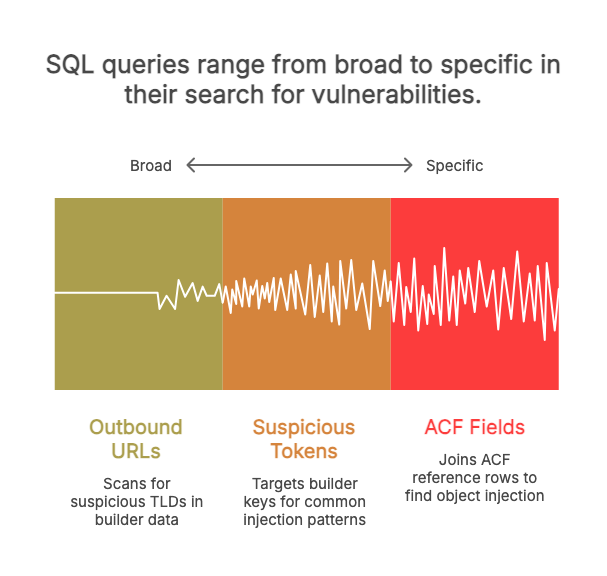
What to do with hits
Before touching any row, back up the specific post’s data. A targeted mysqldump is the right scope — fast enough to run right now, narrow enough to restore precisely if needed:
mysqldump your_db_name wp_postmeta --where="post_id=NNN" > postmeta_post_NNN_backup.sqlSwap NNN for the actual post_id from your query results. Run this before any UPDATE or DELETE — no exceptions. Once you have the backup, open the post in the WordPress admin, verify what the builder actually renders, and diff the suspect meta_value against the same row on a clean staging copy. A single suspicious row on one post is a manual review problem. Hits spread across dozens of posts, or hits that reappear after you clean them, mean the entry vector is still open — and that’s a file-layer problem. Wordfence, Sucuri, MalCare, and Patchstack are the right tools to find what’s writing to your database; the SQL tells you what has already been written.
If you want the database layer covered on a schedule without writing your own queries, Content Guard Pro does this at the plugin level — scanning wp_postmeta, Gutenberg blocks, and serialized page-builder data, complementing the file-layer tools you’re already running rather than replacing them.
Your next step: run the audit yourself
Open phpMyAdmin or a WP-CLI session and run Query 1 against your database right now. If it returns nothing, your builder rows are clean. If it returns hits, back up the affected posts using the targeted mysqldump command shown above, then open each flagged post in the WordPress editor and verify what it actually displays. Compare the suspect meta_value against the same row on a clean staging copy — that comparison will tell you whether the hit is a legitimate widget setting or an injected payload.
If you find nothing: file-layer scanners like Wordfence and Sucuri are catching your entry vectors, and your current workflow is sufficient.
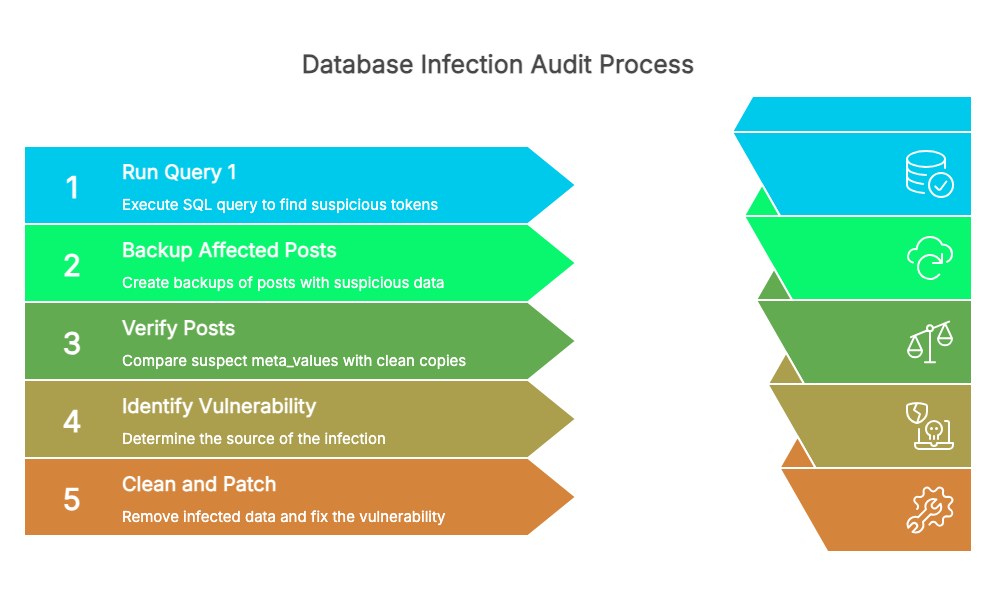
If you find poisoned rows: those rows confirm the infection is database-resident, which means an active vulnerability is still writing to your wp_postmeta table right now. Cleaning the rows is the immediate action, but finding and closing the entry vector is the only permanent fix. Check Wordfence Threat Defense, Sucuri’s plugin audit, or your hosting provider’s server logs for the vulnerability responsible — commonly a dated or unpatched version of ACF, Elementor, Divi, or a third-party page-builder extension. If you want wp_postmeta scanning on a recurring schedule without managing queries yourself, Content Guard Pro extends your existing file-layer tools with database-layer coverage, but the SQL above gives you the same information right now, for free, in phpMyAdmin.