
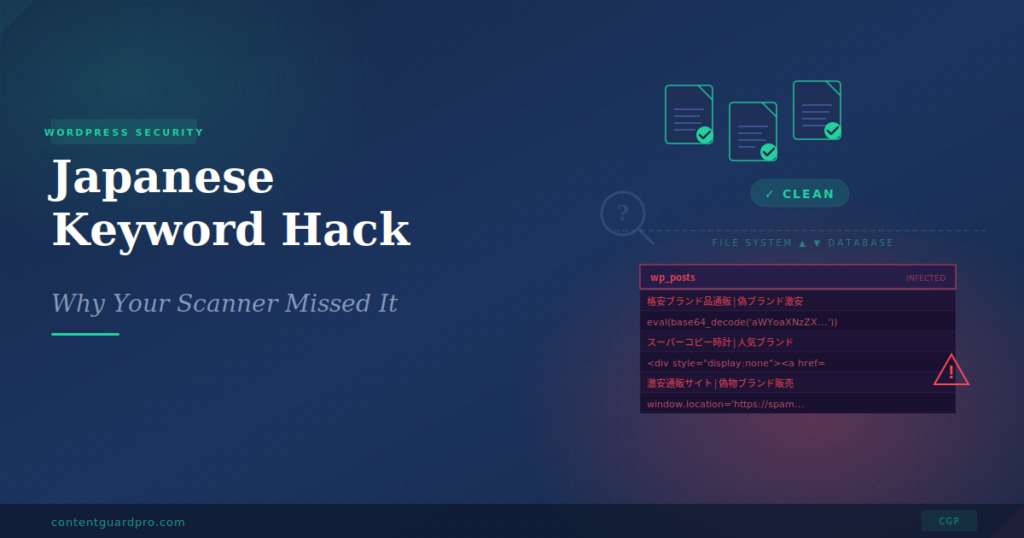
You ran the scan. Wordfence came back green. Sucuri said “clean.” And yet, when you Google your own site, the search results are full of Japanese characters, counterfeit handbag listings, and URLs you’ve never seen before.
You’re not losing your mind. You’re dealing with a Japanese keyword hack, and your scanner didn’t miss it because it’s broken. It missed it because it was never designed to look where this particular infection lives.
Let’s walk through exactly how this attack works, why file-based scanners can’t catch it, and what you can actually do about it.
What is the Japanese keyword hack, exactly?
The Japanese keyword hack is a form of SEO spam that targets WordPress sites. Attackers inject thousands of auto-generated pages filled with Japanese text, counterfeit product listings, and affiliate links into your site, typically without touching a single PHP file on your server.
The goal is purely financial. Hackers hijack your domain’s established authority with Google to rank their spam pages. They promote counterfeit goods (fake designer bags, knockoff watches, grey-market pharmaceuticals) by exploiting your site’s existing search reputation.
What makes this attack so difficult to catch is cloaking. When you visit your homepage, everything looks normal. When Googlebot crawls the same URL, it sees the injected spam pages. This means the infection can run undetected for weeks or months, silently destroying your search rankings while you browse your own site and see nothing wrong.
By the time you notice (usually when a client calls, or you check Google Search Console and find thousands of newly indexed pages in Japanese) the SEO damage is already significant.
The real problem: your scanner is looking in the wrong place
Here’s the part most “how to fix the Japanese keyword hack” guides skip over too quickly: why your trusted security plugin said “all clear” while your site was actively serving spam to Google.
The answer is straightforward. Tools like Wordfence and Sucuri are file-based scanners. They’re excellent at what they do. They compare your WordPress core files, theme files, and plugin files against known clean versions and flag modifications. If someone drops a malicious PHP file into your /wp-content/uploads/ directory, these tools will find it.
But the Japanese keyword hack doesn’t always work that way. Modern variants of this attack store the spam content inside your WordPress database, in tables like wp_posts, wp_postmeta, and wp_options. File-based scanners don’t inspect these tables. They’re not ignoring the threat; the threat is simply outside their scope.
It’s like having a home security system that monitors every door and window but doesn’t check whether someone is already hiding in the basement. The system works perfectly. It’s just not looking where the intruder actually is.
The four vectors your scanner didn’t cover
To understand how the Japanese keyword hack evades detection, you need to understand the four primary attack vectors it uses. Each one targets a blind spot in traditional file-based security.
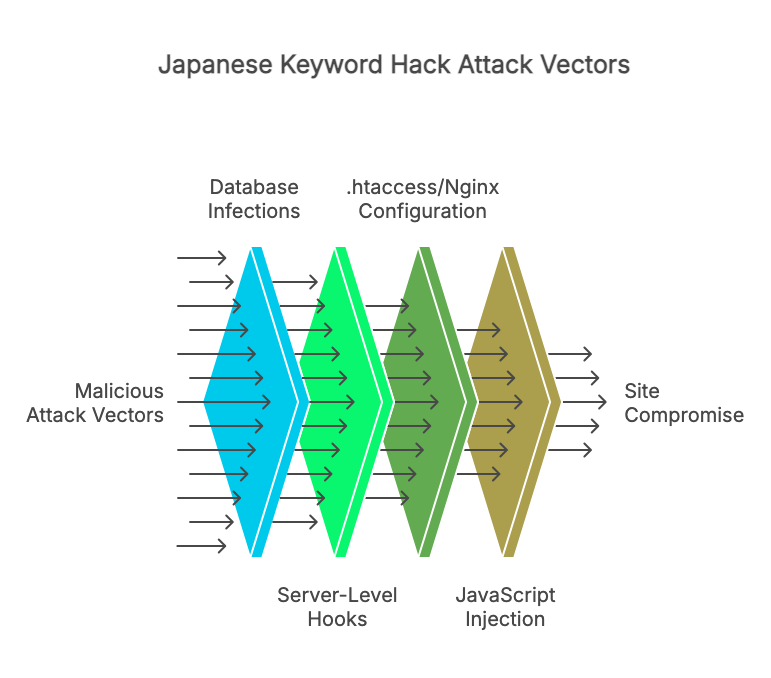
1. Database infections: the primary attack surface
This is the big one. The most persistent and difficult-to-detect variant of the Japanese keyword hack stores malicious content directly in your WordPress database, that’s why it is important to secure it.
Attackers inject spam into the wp_posts table, creating hundreds or thousands of posts with Japanese titles, gibberish URLs, and hidden affiliate links. These posts often use post_status values like publish with post types that your theme renders publicly, so Google indexes them immediately.
But it goes deeper than just fake posts. Attackers also target:
wp_postmeta — Metadata fields associated with legitimate posts. An attacker can inject Base64-encoded JavaScript into a postmeta field like _wp_page_template or a custom field used by your page builder. When the page renders, the encoded payload decodes and executes, loading spam content, triggering redirects, or injecting hidden links. Your post content looks clean in the editor, but the metadata is serving malware on every page load.
wp_options — The options table controls site-wide settings. Attackers inject entries containing base64_decode calls or serialized PHP arrays that load malicious scripts on every page. A single compromised option can turn your entire site into a spam distribution network. Because the options table is loaded on every request, this is one of the most impactful infection points.
Malicious admin users — Attackers frequently create hidden administrator accounts in wp_users. These accounts may have inconspicuous usernames and email addresses. Even if you clean every trace of spam from your content, a hidden admin account lets the attacker log back in and re-inject everything within hours.
None of these infections leave a trace in your filesystem. Your wp-content directory is untouched. Your core files are pristine. Your file scanner runs, finds nothing, and gives you a green checkmark while your database is full of spam.
2. Server-level hooks: persistent malicious tasks
Even after you clean infected database entries, the hack keeps coming back. This is usually because the attacker has established persistence through scheduled tasks.
System cron jobs are a common persistence mechanism. If the attacker gained server-level access (even briefly), they may have added a cron job that periodically re-injects spam content into your database. This cron job runs at the operating system level, completely invisible to WordPress and any plugin running inside it.
WordPress cron (wp-cron.php) is the application-level alternative. Attackers register malicious scheduled events through the WordPress cron system that fire on every page load or at set intervals. These events call functions that regenerate the spam content, create new fake posts, or re-establish hidden admin accounts. Because wp-cron events are stored in the wp_options table (as serialized data in the cron option), they’re another database-resident threat that file scanners overlook.
This is why so many site owners report that the Japanese keyword hack “keeps coming back” after cleanup. They removed the visible symptoms but left the re-infection mechanism running in the background.
3. The .htaccess and Nginx configuration layer
The Japanese keyword hack frequently uses server configuration files to implement its cloaking behavior, the mechanism that shows clean pages to human visitors while serving spam to search engine crawlers.
On Apache servers, attackers modify the .htaccess file to add rewrite rules that detect Googlebot’s user agent string and redirect it to spam-generating scripts. The rules might look like legitimate SEO-related redirects, making them easy to overlook during a manual review.
Some attacks go further and create multiple .htaccess files in subdirectories, each one handling redirects for a different batch of spam URLs. If you only check the root .htaccess, you’ll miss the others entirely.
On Nginx servers, the equivalent modifications happen in server block configurations. These are typically not accessible through WordPress at all, requiring SSH or hosting panel access to inspect.
While .htaccess is technically a file (and some security plugins do check it), many scanners only compare it against a known default template. If the attacker’s rewrite rules are appended after your legitimate rules, a simple “does this match the default?” check won’t catch them. And if the attacker has also generated dynamic verification tokens inside the .htaccess file to maintain Google Search Console access, those are another artifact you need to identify and remove.
4. JavaScript and external resource injection
The fourth vector operates at the browser level. Attackers inject malicious JavaScript either directly into post content or through compromised external resources. This JavaScript runs in your visitors’ browsers and can:
Load content dynamically from external servers. A small, innocent-looking <script> tag with an external src attribute fetches a payload from an attacker-controlled domain. The script itself passes any file integrity check because it’s just a single line of HTML. The malicious behavior lives on the remote server and can change at any time.
Inject hidden content after page load. DOM manipulation scripts can insert spam links, hidden <div> elements, and redirect logic after the page has finished loading. These elements exist only in the rendered DOM; they never appear in your post content or theme files.
Use obfuscation to avoid pattern matching. Payloads encoded with fromCharCode(), atob(), or multi-layer Base64 encoding don’t contain recognizable spam keywords in their source form. They look like random strings of characters until they execute. A scanner checking for the word “viagra” or “casino” in your files will never match ZG9jdW1lbnQud3JpdGU=.
Exploit compromised third-party scripts. If a legitimate CDN or analytics library you depend on gets compromised (a supply-chain attack), every site using that script becomes an unwitting distributor. Your files haven’t changed. Your database hasn’t changed. But your site is now serving malicious content through a resource you trusted.
These JavaScript-based attacks are particularly dangerous because they can operate entirely outside both your filesystem and your database. File scanners won’t see them, and basic database checks won’t either.
What the Japanese keyword hack actually looks like in your database
If you want to understand whether your database is compromised, here’s what to look for. Open phpMyAdmin (or your preferred database tool) and run these queries:
Check for suspicious posts with Japanese content:
SELECT ID, post_title, post_status, post_type, post_date
FROM wp_posts
WHERE post_title REGEXP '[一-龥ぁ-んァ-ヶ]'
   OR post_content REGEXP '[一-龥ぁ-んァ-ヶ]'
ORDER BY post_date DESC
LIMIT 50;
Check for Base64-encoded payloads in post content:
SELECT ID, post_title, post_type
FROM wp_posts
WHERE post_content LIKE '%base64_decode%'
   OR post_content LIKE '%eval(%'
   OR post_content LIKE '%fromCharCode%'
LIMIT 50;
Check the options table for injected scripts:
SELECT option_name, LEFT(option_value, 200) AS snippet
FROM wp_options
WHERE option_value LIKE '%base64_decode%'
   OR option_value LIKE '%eval(%'
   OR option_value LIKE '%<script%'
ORDER BY option_id DESC
LIMIT 20;
Look for unauthorized admin accounts:
SELECT u.ID, u.user_login, u.user_email, u.user_registered
FROM wp_users u
INNER JOIN wp_usermeta m ON u.ID = m.user_id
WHERE m.meta_key = 'wp_capabilities'
  AND m.meta_value LIKE '%administrator%'
ORDER BY u.user_registered DESC;
If any of these queries return unexpected results, your database is likely compromised, even if every file-based scan you’ve run came back clean.
These queries are useful for manual investigation, but running them regularly across multiple sites isn’t practical. This is the exact scenario that calls for automated database scanning.
Covering the blind spot: database-first scanning
File-based scanners are essential. They catch file modifications, backdoor scripts, and compromised plugins. Keep running them. But if you’re dealing with a Japanese keyword hack, or you want to catch one before it tanks your search rankings, you also need to scan where the infection actually lives.
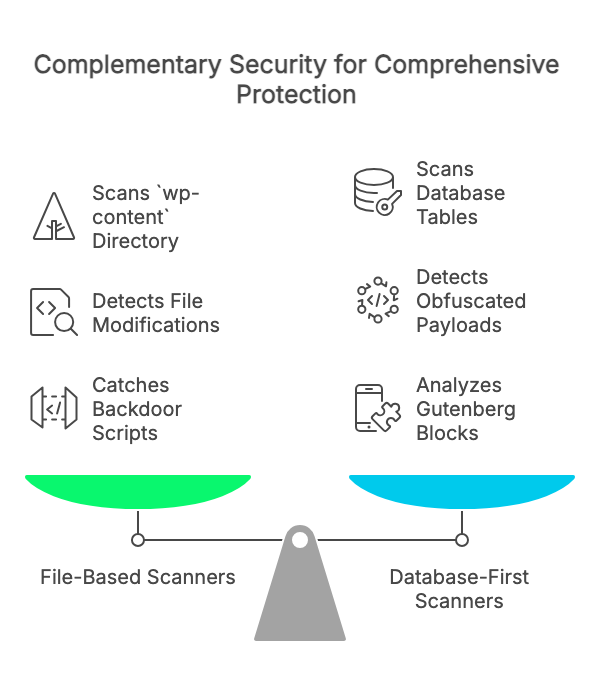
Content Guard Pro is a database-first WordPress security scanner built specifically for this purpose. While file scanners patrol your wp-contentdirectory, Content Guard Pro inspects the tables where attackers actually hide malicious content: wp_posts, wp_postmeta, and wp_options.
The scanner’s core strength is detecting SEO spam lexicons (pharma keywords, gambling terms, cloaked affiliate links) inside your post and page content. Rather than simple keyword searches, it uses word-boundary matching and contextual analysis to minimize false positives.
Obfuscated payloads get the same treatment. The multi-layer encoding detection recursively decodes through up to three layers of Base64, URL encoding, HTML entities, ROT13, hex, and octal obfuscation. Those encoded strings that slip past pattern-matching scanners get unwrapped and inspected at each layer.
Modern WordPress stores a substantial share of its rendered page content in the database rather than in template files, particularly on sites using Gutenberg or page builders like Elementor. Content Guard Pro includes a recursive Gutenberg block parser and safe serialized data scanner that inspects these structures, catching malware hidden inside page builder widgets and nested postmeta that basic SQL searches would miss.
CSS-based cloaking (display:none, visibility:hidden, opacity:0, font-size:0) is a signature technique of this hack. The scanner flags hidden content that contains external links or suspicious payloads, while distinguishing between accessibility-related hidden elements and genuinely malicious cloaking.
Every finding gets a 0–100 confidence score with a severity label (Critical, Suspicious, or Review). A Base64 eval() block might score 92, while a legitimate embedded font declaration might score 35. You see the highest-risk items first and can triage edge cases afterward.
Content Guard Pro is designed to complement your existing security stack, not replace it. If you’re running Wordfence or Sucuri, keep them. They cover your files. Content Guard Pro covers your database. Together, you eliminate the blind spot that this attack exploits.
Japanese keyword hack removal: your step-by-step checklist
If you’ve confirmed (or suspect) a Japanese keyword hack on your site, here’s the sequence that works. This isn’t the generic “update your passwords and hope for the best” advice. It’s a methodical, targeted approach based on how this specific attack operates.
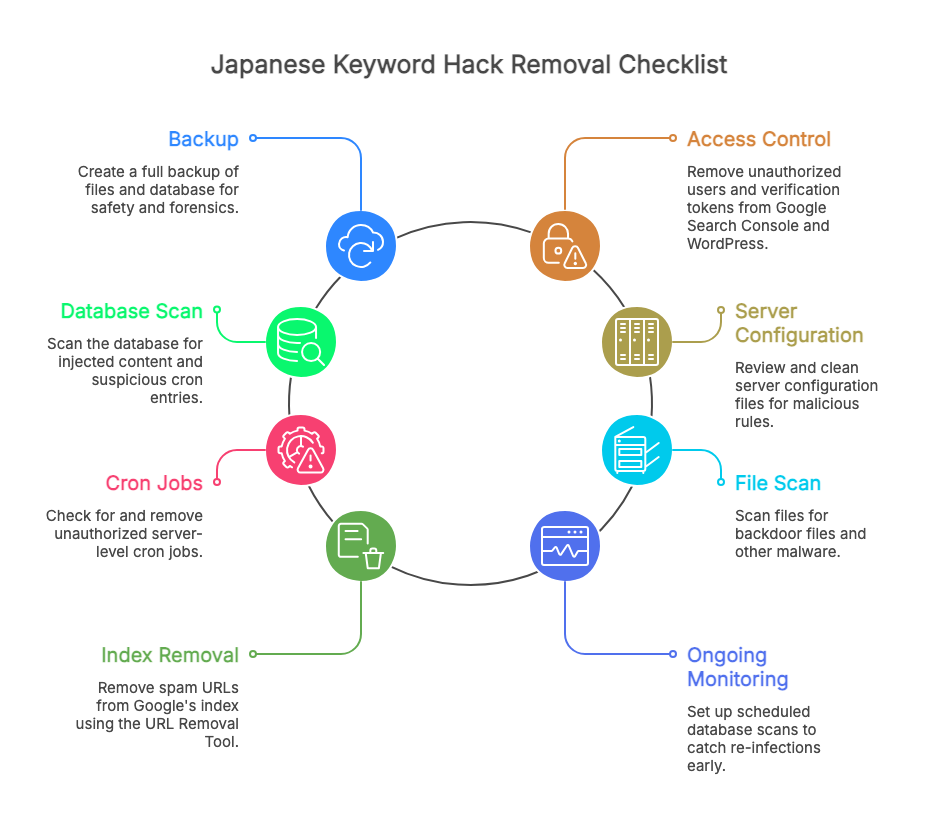
Step 1: Take a full backup before you touch anything
Back up both your files and your database. Yes, this backup will contain malware. That’s fine; it’s your safety net if something goes wrong during cleanup, and it serves as forensic evidence for comparing clean versus infected content later. Store it off-server.
Step 2: Identify and remove unauthorized access
Check your Google Search Console for unrecognized property owners or users. Attackers frequently add themselves as verified owners to maintain control. Revoke any unfamiliar accounts immediately and remove their verification tokens.
Then inspect your WordPress users table. Remove any administrator accounts you don’t recognize. Check wp_users and wp_usermeta directly; some hidden accounts may not appear normally in the WordPress dashboard.
Step 3: Scan your database for injected content
Run the SQL queries from the previous section, or use Content Guard Pro to automate the process. Look for spam posts, encoded payloads in postmeta, and suspicious option values. Remove or clean the infected entries.
Pay particular attention to the cron entry in wp_options. This is where wp-cron scheduled events are stored. Any unfamiliar scheduled hooks need to be removed to prevent re-infection.
Step 4: Clean server configuration files
Review your root .htaccess file and check for .htaccess files in subdirectories. Look for rewrite rules that reference user agents (Googlebot, Bingbot) or redirect to unfamiliar domains. If you’re unsure what’s legitimate, replace the file with WordPress’s default .htaccess content and regenerate your permalinks via Settings → Permalinks → Save Changes.
Step 5: Check for server-level cron jobs
If you have SSH access, run crontab -l to list your cron jobs. Look for entries you didn’t create, especially any that reference PHP scripts or curl/wget commands targeting your WordPress directory. Contact your hosting provider if you don’t have SSH access and ask them to check for you.
Step 6: Scan your files (yes, do this too)
Run a file-based scan with Wordfence, Sucuri, or your preferred tool. While the Japanese keyword hack primarily targets the database, some variants also drop backdoor files for persistence. Cover both layers.
Step 7: Remove spam from Google’s index
Don’t wait for Google to recrawl. Use the URL Removal Tool in Google Search Console for individual spam URLs, or set up 410 (Gone) status codes for the spam URL patterns. This signals to Google that the content is permanently removed. Monitor the Coverage report in Search Console daily until the spam pages disappear from the index.
Step 8: Set up ongoing database monitoring
Cleaning a Japanese keyword hack once isn’t enough. The attack surface that allowed the initial infection (an outdated plugin, a weak credential, a misconfigured permission) may still exist. Set up scheduled database scans so you catch any re-infection quickly, within hours rather than weeks.
Content Guard Pro’s Premium tier includes daily scheduled scans with email alerts and webhooks, so you get notified the moment something suspicious appears in your database, before Google indexes it and before your clients see it.
Why this attack keeps working
The Japanese keyword hack persists because it exploits a fundamental gap in how most WordPress security is implemented. The entire security ecosystem (plugins, managed hosting scanners, and cleanup services) has evolved around file integrity monitoring. That made sense when attackers primarily modified PHP files. But the threat landscape has shifted.
Modern WordPress stores a substantial share of its rendered page content in the database rather than in template files. Gutenberg blocks, page builder widgets, serialized metadata, scheduled events: all of it lives in database tables that file scanners never touch. Attackers began targeting this blind spot as early as 2015, and database-resident variants have grown steadily more common since. The security tooling is still catching up.
If you take one thing from this article, let it be this: a clean file scan does not mean a clean site. If your search results are showing Japanese keyword spam, the infection is almost certainly in your database. Look there.
Next steps
If you’re actively dealing with this attack, start with the checklist above. The SQL queries will tell you whether your database is compromised, and the step-by-step removal process will walk you through cleanup.
For ongoing protection, install Content Guard Pro from WordPress.org (free) and run a Quick Scan on your site. It takes a few minutes and scans every post and page in your wp_posts table for hidden spam, malicious scripts, encoded payloads, and the signature patterns of this hack.
If you’re managing client sites, this is especially worth your time. The hack is the kind of threat that damages not just SEO rankings but client trust, and it’s the kind your existing security stack was never built to catch.
Traditional file scanners are essential. But if it lives in the database, you need to scan the database.