
You’ve done everything right. You ran Wordfence. You checked file integrity. You even reinstalled WordPress core. And yet, Google Search Console is still screaming about phishing pages, or clients are complaining about weird “legal agreement” links appearing in search results.
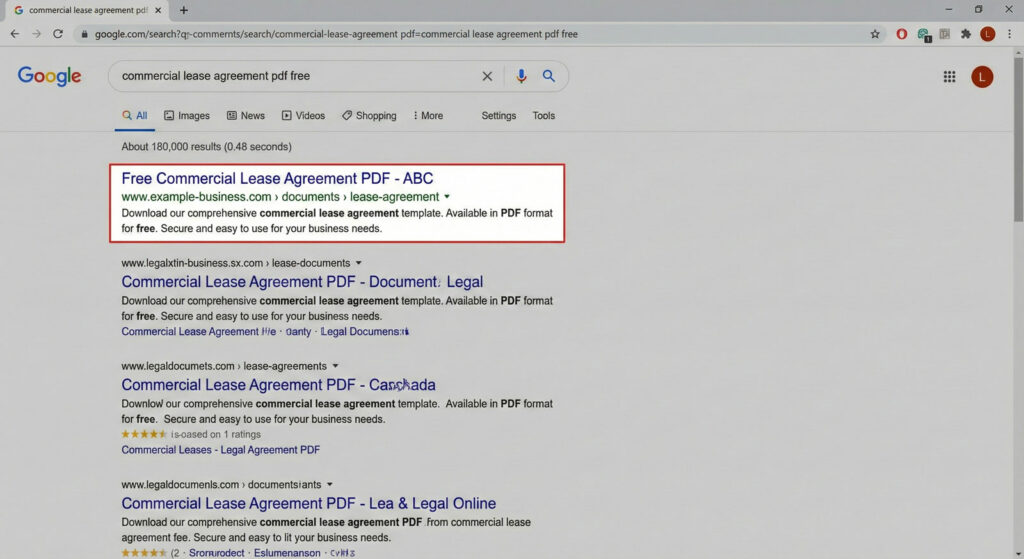
If your file scanner says “all clear” but your site is acting compromised, you’re dealing with a database-resident infection. Not a file problem. A content problem.
GootLoader stopped dropping obvious files in late 2025. Instead, it started living in your content. Here’s what changed—and how to find it.
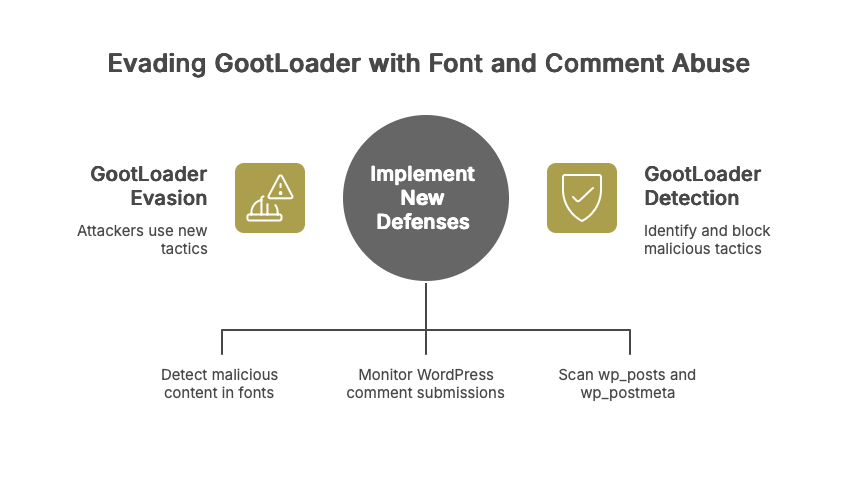
The 2026 Shift: WOFF2 Fonts and Comment Endpoint Abuse
In October 2025, GootLoader campaigns shifted tactics. Instead of relying on obfuscated JavaScript files that signature-based scanners easily flag, attackers began using two techniques designed specifically to evade detection:
1. WOFF2 Font Obfuscation
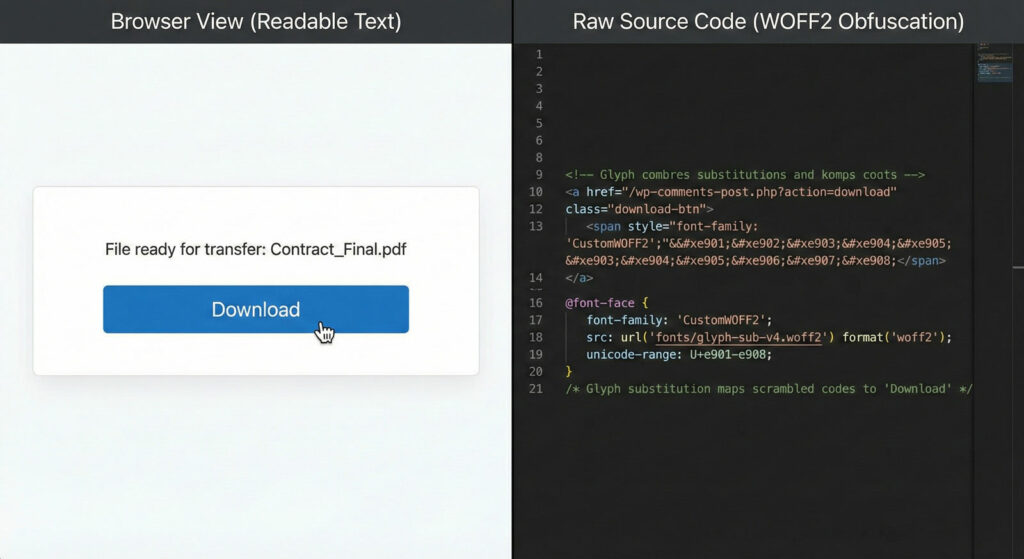
Custom web fonts hide malicious content through glyph substitution. The raw code in your database shows garbled characters: Flörìdà_HÖÀ_Cömmìttèè_Mèèting_Guidè.pdf
When rendered in a victim’s browser with the attacker’s custom font loaded, these same characters transform into perfectly readable text: Florida_HOA_Committee_Meeting_Guide.pdf
To a file scanner examining your database, the code looks like broken Unicode or standard CSS. To a human browser, it renders as a clickable “Download Contract” button. The malicious code is hiding in plain sight, disguised as typography.
2. The /wp-comments-post.php Delivery
Instead of uploading malicious .exe or .zip files directly (which triggers security alerts), attackers abuse WordPress’s standard comment submission endpoint to deliver XOR-encrypted ZIP payloads. Each payload is uniquely encrypted per filename, making hash-based detection futile.
To WAFs and security plugins monitoring file uploads, this traffic looks like legitimate user interaction—comment submissions. The malicious payload is only assembled client-side after the user clicks “Download.”
Why file scanners miss this: The “Download” button and fake forum overlay are injected via database content—posts, postmeta, or options. File integrity scanners looking at /wp-content/themes/ won’t find anything because there’s nothing wrong with your files. The infection lives in wp_posts or wp_postmeta.
Traditional security plugins are excellent at what they do: scanning files, blocking brute force attacks, hardening installations. But there’s a gap. And attackers know about it.
The Manual Check: 4 SQL Queries to Run
If you have phpMyAdmin or WP-CLI access, you can check for this yourself. You don’t need our plugin to find the fire—you just need to know where to look.
⚠️ Critical Warning: Always backup your database before running manual SQL queries. These are for detection only. Never delete rows directly from production databases without confirming they’re malicious.
Query 1: The “SEO Poisoning Honeypot” Check
GootLoader targets high-volume “boring” search terms like “agreement,” “contract,” “form,” or “template” to poison search results. Check for unauthorized published posts:
SELECT ID, post_title, post_name, post_status, post_date
FROM wp_posts
WHERE post_status IN ('publish', 'pending', 'draft')
AND post_type = 'post'
AND (
    post_title LIKE '%agreement%'
    OR post_title LIKE '%contract%'
    OR post_title LIKE '%template%'
    OR post_title LIKE '%form%'
    OR post_title LIKE '%worksheet%'
)
AND post_date > '2025-10-01'
ORDER BY post_date DESC;
What to look for: Posts you didn’t create, often with generic titles like “Simple Rental Agreement PDF” or “Non-Disclosure Agreement Template 2025.”
Query 2: The Obfuscation Check
GootLoader injects obfuscated JavaScript using String.fromCharCode, base64 encoding, or references to custom WOFF2 fonts:
SELECT ID, post_title, post_type, post_status
FROM wp_posts
WHERE post_content LIKE '%String.fromCharCode%'
   OR post_content LIKE '%WOFF2%'
   OR post_content LIKE '%base64%eval%'
   OR post_content LIKE '%atob(%'
ORDER BY post_modified DESC
LIMIT 50;
What to look for: Posts containing large blocks of encoded JavaScript or references to custom font files you didn’t add.
Query 3: The Hidden Element Check
Modern variants hide trigger elements using CSS cloaking:
SELECT ID, post_title, post_type, post_status
FROM wp_posts
WHERE post_content LIKE '%text-indent:-9999px%'
   OR post_content LIKE '%visibility:hidden%<script%'
   OR post_content LIKE '%visibility:hidden%<iframe%'
   OR post_content LIKE '%display:none%<script%'
   OR post_content LIKE '%opacity:0%<a href=%'
ORDER BY post_modified DESC
LIMIT 50;
What to look for: Hidden elements containing external scripts, iframes, or links. Legitimate themes use visibility:hiddenfor mobile menus—you’re looking for hidden elements that also contain external resources.
Query 4: The Postmeta Check (Advanced)
GootLoader sometimes hides payloads in custom fields:
SELECT pm.post_id, pm.meta_key, p.post_title
FROM wp_postmeta pm
JOIN wp_posts p ON pm.post_id = p.ID
WHERE LENGTH(pm.meta_value) > 1000
AND (
    pm.meta_value LIKE '%<script%'
    OR pm.meta_value LIKE '%<iframe%'
    OR pm.meta_value LIKE '%fromCharCode%'
    OR pm.meta_value LIKE '%WOFF2%'
)
ORDER BY pm.post_id DESC
LIMIT 50;
What to look for: Custom fields containing scripts or encoded content in posts you didn’t create.
The Problem with Manual Hunting
Run these queries and you might get 0 results (good!), 5 obvious malicious results (bad but fixable), or 500 mixed results because your legitimate theme uses visibility:hidden for accessibility.
Distinguishing “bad” hidden content from “good” hidden content is where manual approaches break down. You end up spending hours reading code snippets, checking domains against allowlists, trying to decide what’s safe to delete.
You shouldn’t be grepping through SQL dumps to find spam links. That’s what tools are for.
How Content Guard Pro Handles This Differently
We don’t just grep for keywords. We built our detection engine to solve the “500 mixed results” problem:
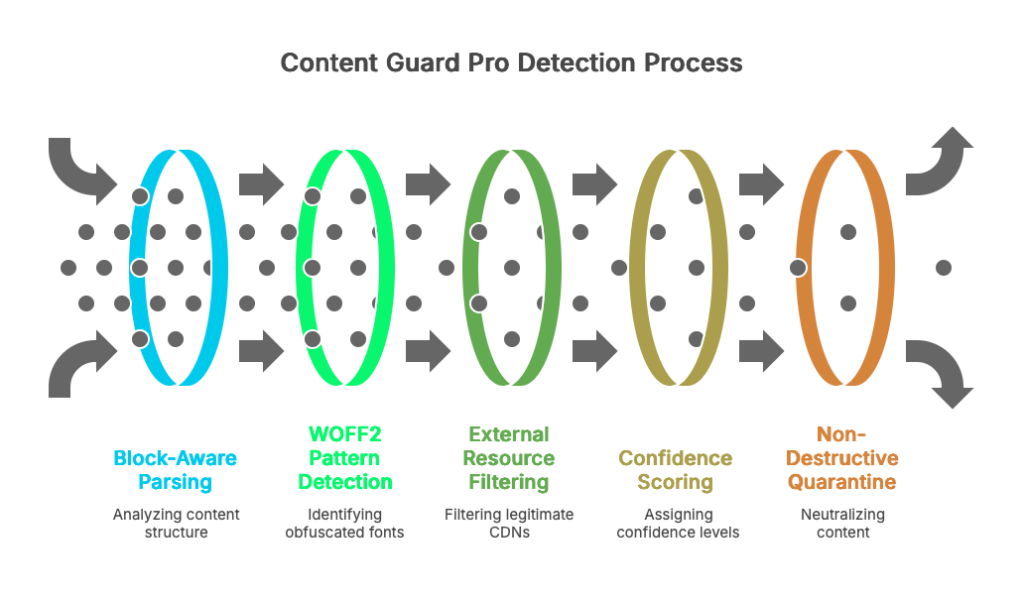
Block-Aware Parsing
We understand that WordPress stores content in Gutenberg blocks and Elementor widgets. We parse the structure, not just raw text. We can detect a hidden <script> inside a specific block without flagging your legitimate navigation menu.
WOFF2 Pattern Detection
We look for the glyph substitution patterns GootLoader actually uses. We identify custom fonts being used to obfuscate filenames—not just flag every site that uses web fonts.
External Resource Filtering
We maintain an allowlist of legitimate CDNs (Google Fonts, YouTube, Vimeo, etc.). We only flag external scripts from non-allowlisted domains, dramatically reducing false positives.
Confidence Scoring
Every finding gets a 0-100 confidence score:
- Hidden element + external script = High confidence
- Hidden element alone = Low confidence (might be accessibility)
- WOFF2 font from Google Fonts CDN = Ignored
- WOFF2 font from suspicious domain = Critical
Non-Destructive Quarantine
Instead of “delete and hope,” we neutralize content on render. The database stays intact. You review, verify, and only permanently fix what you’re certain is malicious. One-click rollback if we got it wrong.
Who This Matters For
If you’re managing 1-2 personal sites and have time to run SQL queries, you can find GootLoader manually. It’s tedious, but doable.
If you’re managing 50 agency sites and don’t have time to grep through databases for every client, this is what Content Guard Pro solves. We built it because we got tired of doing this manually for clients.
The gap we fill: File scanners are essential for file integrity and WAF protection. We complement them by covering the database layer—where GootLoader and similar content-layer threats actually live.
File-level security is just the start. If you care about SEO, you need to care about content-level security.